Guru3D.com
  • HOME
  • NEWS
    • Channels
    • Archive
    • Search
    • Submit
  • DOWNLOADS
    • New Downloads
    • Categories
    • Archive
    • Search
    • Submit
  • GAME REVIEWS
  • ARTICLES
    • Editorials
    • Guru3D VGA Charts
    • Rig of the Month
    • Join ROTM
    • PC Buyers Guide
    • Dated content
    • More Categories
  • HARDWARE REVIEWS
    • Videocards
    • Processors
    • Audio
    • Motherboards
    • Memory and Flash
    • SSD Storage
    • Chassis
    • Power Supply
    • Laptop and Mobile
    • Smartphone
    • Networking
    • Keyboard Mouse
    • Cooling
    • Knowledgebase
    • Search articles
    • More Categories
  • FORUMS
  • SEARCH
    • Search Articles
    • Search News
    • Search Files
  • NEWSLETTER
  • CONTACT

New Reviews
EVGA GeForce GTX 780 SC ACX review
Gigabyte GeForce GTX 780 WindForce 3x OC review
GeForce GTX 780 SLI and Multi monitor review
GeForce GTX 780 review
OCZ Vertex 450 SSD review
Gigabyte GeForce GTX 650 Ti Boost OC WindForce 2X review
MSI Radeon HD 7790 TurboDuo OC review
Metro Last Light VGA Graphics Benchmark performance test
Noctua NH-U12S and NH-U14S review
ASUS GeForce GTX 670 DirectCU Mini review

New Downloads
PrecisionX Download Version 4.2.0
GeForce 320.18 WHQL Driver Download
AMD Catalyst Application Profile Download 13.5 CAP1
MSI Afterburner 3.0.0 Beta 10 Download
PhysX System Software 9.13.0325 Download
GPU-Z Download 0.7.1
HWiNFO32 4.18 Download
HWiNFO64 4.18 Download
GeForce 320.14 BETA Driver Download
Nvidia Lifelike Human Face Rendering Tech Demo Download


New Forum Topics
by: Mraz GPU power draw massive dropsby: Pill Monster Galaxy S info....by: ESlik Question for Hilbert.re-cooling.by: bishi Geforce GTX 780 Owners Clubby: ozdennisb i7 3770k compatibilityby: helder Geforce Experience impressionsby: playst Sound blaster Z vs normal XFI Titanium which one is better ?by: putty LEAP Motion - Say goodbye to your mouse and keyboardby: YY911SF Next big thing from the Nvidia Driver Team?by: Pill Monster Arma 3


Online Users
There are currently 2866 user(s) online:
DM789, EddieG, Google, GPU, leopr, Live Search, Memorian, MoosePower, Mraz, MSN, Shataan, Yahoo


Guru3D.com » Review » Zalman HD160XT Plus HTPC Chassis review » Page 2

Zalman HD160XT Plus HTPC Chassis review

Posted by Hilbert Hagedoorn on: 02/18/2008 02:00 PM [ 0 comment(s) ]

Page 2
Tweet


Zalman HD160XT Plus Chassis

When you get your first glimpse at the Zalman chassis the one word that comes to mind is excellence.

It's a chassis that will blend in perfectly with the rest of the surrounding components namely the TV, Receiver and such. The casing is made of an aluminum front panel with a selection of hidden I/O ports for painless connectivity.

A great feature of the the HD160XT Plus is the fact that it is compatible with both ATX and Micro-ATX motherboards. So you can insert any modern mainboard in it as it'll fit and you'll have plenty of room to work with.

Inside, you will find an intake fans and exhaust fans. Zalman will provide sufficient cooling for the HTPC yet will manage to do this silently.

As you'll be able to notice on the next pages in our photo-shoot, this is an impressive case with a lot of functionality as you can install all peripherals you want to install. I mean it, you could easily mount a SLI setup in there as there is lots of space to work with. We decided to use a full ATX motherboard and silent power supply. Inside the chassis you'll notice there's space for Five 3.5” bays and one 5.25” bay. You'll also find a media remote control to power on/off the PC and manage all HTPC functions.

The bigger part of the case is constructed from aluminum (black), and this is an exemplary product when it comes to material thickness and strength, it's all just so sturdy.

Let's have a look at the specification after which I'll take you on a large pictorial showing inside and outs of the Zalman HD160XT Plus Chassis.

Specifications
Enclosure Type Desktop
Dimensions 460(L) x 435(W) x 160(H) mm
Weight 6.8kg (14.9lb)
Material Aluminum
Motherboard Compatibility Standard ATX / micro ATX
Power Supply Compatibility Standard ATX / ATX12V
PCI/AGP Card Compatibility Full Size
Drive Bays 5 X 3.5" Internal Drive Bays, 1 X 5.25" External Drive Bay
Cooling Components Rear Panel : 2 x 80mm Exhaust Fans
Bottom Panel : 1 x 80mm Exhaust Fan (Optional)
Side Panel : 1 x 92mm Exhaust Fan (Optional)
Expansion Slots 7 Slots
Front I/O Ports 2 x USB Ports, 1 x IEEE1394(Firewire) Port, 1 x Microphone, 1 x Headphones
Available Colors Silver / Black
LCD DFSTN NEGATIVE LCD TYPE

What we'll do today is take a good look of the outside and innards of the HTPC chassis, and then start building it. The product will be used by yours truly and since I'm sort of a HTPC buff, we'll connect the HTPC towards a High-def Pioneer plasma screen and to my "precious" THX Ultra2 Certified Onkyo TX-SR875 Hi-Def HDMI receiver. One of the best, if not the best AV receivers I have owned in my lifetime.

Let's go into a pictorial. Talk is cheap right, you need to see this stuff.
Zalman HTPC HD160XT PLUS review

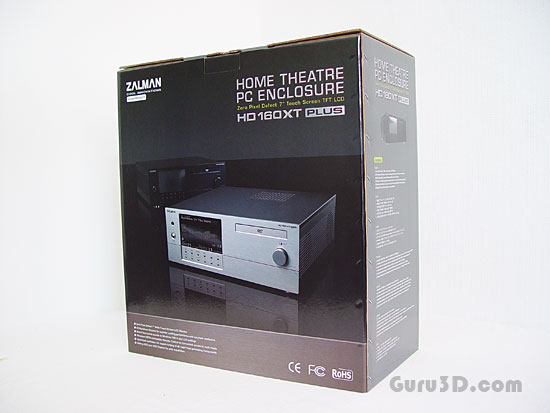
Here's the packaging. A rather sizable box. The photo already gives the magic away; you'll be blown away by the chassis design if you see the first glimpse of it. Sized precisely the same as you regular amplifier or other A/V equipment. Let's unpack.
Zalman HTPC HD160XT PLUS review

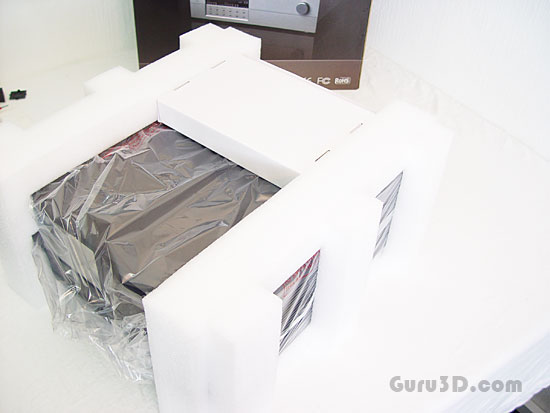
Inside the box is the chassis extremely well packaged in a plastic bag and sandwiched between dense foam blocks to protect it during shipping. Obviously you do not want any scratches or even fingerprints on the chassis. Zalman took care of that for you. I think dropping the box would not even damage the chassis (not that we're trying that though!).
Zalman HTPC HD160XT PLUS review

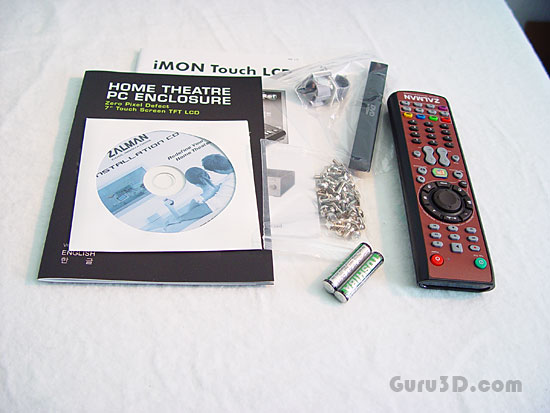
Included with the chassis are software and (compared to last years XT model) a new remote; designed with Windows Media Center Edition in mind, but can be configured to work well with earlier Windows operating systems. It's a Windows VISTA-Compatible Remote Control' Multimedia Software is provided as well (iMon).

The media remote is pretty good and will server every need you have in a Media Center environment.
Zalman HTPC HD160XT PLUS review

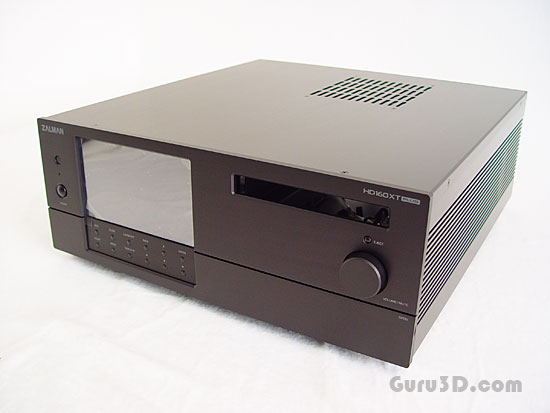
And there she is, even powered off, and uninstalled .. it already looks amazing.


10 pages 1 2 3 4 next »


Guru3D.com » Articles » Zalman HD160XT Plus HTPC Chassis review » Page 2

Related Articles
Zalman HD160XT Plus HTPC Chassis review
A PC in your living room however has to look nice, be silent and functional; and that's quite a challenge as today's computer parts are often noisy and create lot's of heat. Building a HTPC surely isn't an easy task as you need to carefully handpick all components used. For optimal cooling and nice looks today we land at the premises of Zalman. They recently released their Zalman HD160XT Plus HTPC chassis. A seriously gorgeous looking HTPC chassis, made out of aluminum and with a small 7" Zero Defect LCD touch screen (no dead pixels).

Follow Guru3D on Google+ - Facebook - YouTube - Twitter © 2013