Content and video processing | 3D Vision Surround
Video processor
Now, we are not going to explain PureVideo all over again but FERMI based graphics cards, thus GeForce series 400/500, have the latest model video processor embedded, which is actually similar to the one used in the GT220/240/ION2 regarding video capabilities. The VP4 engine now also supports MPEG-4 ASP (MPEG-4 Part 2) (Divx, Xvid) decoding in hardware as an improvement over the previous VP3 engine such as those used in ION based systems.
In short, NVIDIA can offload the decoding of pretty much any MPEG format, the only thing not supported is MPEG-1 which I doubt anyone still uses.
What is also good to mention is that HDMI audio has finally been solved. The stupid S/PDIF cable to connect a card to an audio codec, to retrieve sound over HDMI is gone. That also entails that NVIDIA is not bound to two channel LPCM or 5.1 channel DD/DTS for audio.
Passing on audio over the PCIe bus brings along enhanced support for multiple formats. So VP4 can now support 8 channel LPCM, lossless format DD+ and 6 channel AAC. Dolby TrueHD and DTS Master Audio bit streaming are not yet supported in software, yet in hardware they are (needs a driver update).
DXVA 1080P videos processed by your GPU
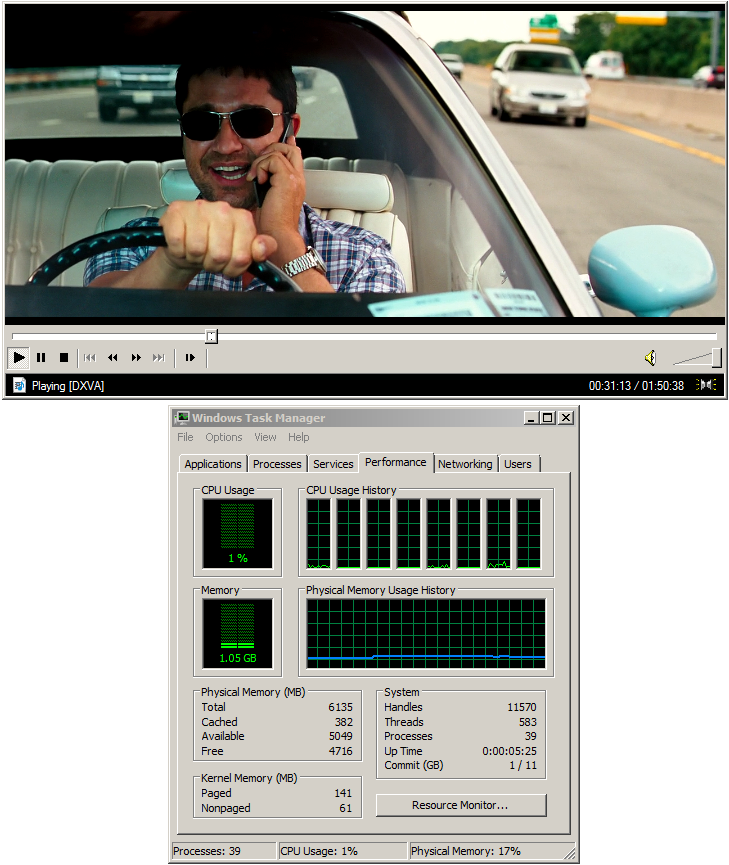 The x.264 format is often a synonym with Matroska MKV, a media file container which often embeds that x.264 content, a much admired container format for media files. Especially the 1920x1080P movies often have some form of h.264 encoding dropped within the x.264 format. As a result, you'll need a very beefy PC with powerful processor to be able to playback such movies, error free without frames dropping and nasty stutters as PowerDVD or other PureVideo HD supporting software by itself will not support it. Any popular file-format (XVID/DIVX/MPEG2/MPEG4/h.264/MKV/VC1/AVC) movie can be played on this little piece of software, without the need to install codecs and filters, and where it can, it will let DXVA enable the playback.
DXVA is short for Direct X Video Acceleration, and as you can tell from those four words alone, it'll try whenever it can to accelerate content over the GPU, offloading the CPU. Which is what we are after.
There's more to this software though:
- A much missed feature with NVIDIA's PureVideo and ATI's UVD is the lack of a very simple yet massively important function, pixel (image) sharpening.
If you watch a movie on a regular monitor, PureVideo playback is great. But if you display the movie on a larger HD TV, you'll quickly wish you could enable little extras like sharpening. I remember the GeForce 7 series having this natively supported from within the Forceware drivers. After GeForce 8 series was released, that feature was stripped away and to date it has to be the most missed HTPC feature ever.
Media Player Classic has yet another advantage, as not only does it try to enable DXVA where possible through the video processor, it can also utilize the shader processors of your graphics cards and use them to post-process content.
A lot of shaders (small pieces of pixel shader code) can be executed within the GPU to enhance the image quality.
Media Player Classic HT edition has this feature built in, you can even select several shaders like image sharpening and de-interlacing... combine them and thus run multiple shaders (enhancement) simultaneously. Fantastic features for high quality content playback. In the screenshot in the upper right corner (click it) you can see MPC HT edition accelerating an x.264 version of Bounty Hunter in 1080P. Thanks to the massive amount of shader cores we can properly post-process and enhance image quality as well, shader based image sharpening (Complex 2) is applied here.
Download Media Player Classic HC (this actually is free public domain software). The GPU is doing all the work, as you can see the h.264 content within the x.264 file container is not even a tiny bit accelerated over the CPU. Read more about this feature right here in this article. You can click on the image to see a full 1080P screenshot.
Folding@Home using the GeForce GPUs
 Folding at home is a project where you can have your GPU or CPU (when the PC is not used) help out solving diseases by folding proteins. Over the past 12 months a lot of progress has been made between the two parties involved. And right now there is a beta folding client available that works with GeForce Series 8, 9 and GTX 200 / 400 / 500 graphics processors. It is CUDA based... meaning that all CUDA ready GPUs can start folding.
Guru3D team is ranking in the Folding@Home top 70, yes... I'm very proud of our guys crunching these numbers, especially since there are tens of thousands of other teams.
The client is out, if possible please join team Guru3D and let's fold away some nasty stuff. The good thing is, you won't even notice that it's running.
Our Folding@Home info can be found here:
- Team Guru3D Homepage
- Team Guru3D support forums
- GPU2 -> GPU3 Transition Guide For Windows + Link To Linux
Our team number is 69411 and if you decide to purchase a GeForce GTX 200 / 400 / 500 product, guys, promise me you'll use it to fold for us. Let's make Team Guru3D the biggest one available guys, join our team.
NVIDIA 3D Vision Surround
Along with the Series 400 and 500 GPUs also comes a technology called NVIDIA 3D Surround -- which is supported by their latest GeForce Forceware drivers (download here).
3D Vision Surround allows you to play on three 3D displays simultaneously, and span your entire game across all three panels for a very immersive, rocking 3D environment. Of course, an idea carefully borrowed from ATI (Eyefinity) with the addition of the 3D Stereo part that is. Would ATI not have introduced Eyefinity, then NVIDIA would have never tried to integrate this technology. So who doesn't love competition?
First off, you can also use this Surround technology in 2D mode too -- 3D Stereo with goggles is really not a requirement.
3D Vision Surround was officially launched alongside the GeForce GTX 470/480 release. There is however good news for GeForce GTX 260, 275, 280, 285 and 295 owners. 3D Vision Surround will be supported on that series as well, all you'll need is a driver update, two cards and three monitors. Preferably with a 3D Vision kit of course.
So to recap: 3D Vision Surround offers 3D Vision support spanned across three displays, effectively allowing you to run three 3D displays simultaneously.
We mentioned this a paragraph or two ago already, there is a downside alright. SLI will be a requirement as the cards can only cope with 2 DVI outputs. So yes, two cards set up in SLI are a requirement, making gaming on three monitors definitely an expensive thing to accomplish. But granted, it really is a heck of a lot of fun though.
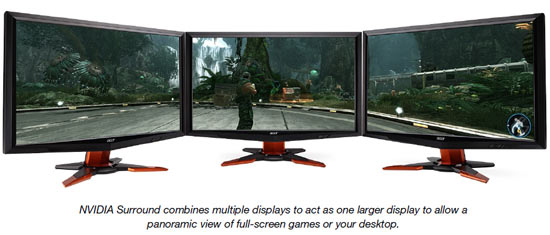
3D Surround Stereo with three monitors
NVIDIA includes software controls for bezel correction allowing you to compensate for monitor bezel gaps. So to recap once more, NVIDIA 3D Surround is a derivative, much like ATI Eyefinity, which will also work with three monitors; surround vision with the 3D goggles is not a requirement, an SLI setup with series 400 / 500 cards however is.
