Guru3D.com
  • HOME
  • NEWS
    • Channels
    • Archive
    • Search
    • Submit
  • DOWNLOADS
    • New Downloads
    • Categories
    • Archive
    • Search
    • Submit
  • GAME REVIEWS
  • ARTICLES
    • Editorials
    • Guru3D VGA Charts
    • Rig of the Month
    • Join ROTM
    • PC Buyers Guide
    • Dated content
    • More Categories
  • HARDWARE REVIEWS
    • Videocards
    • Processors
    • Audio
    • Motherboards
    • Memory and Flash
    • SSD Storage
    • Chassis
    • Power Supply
    • Laptop and Mobile
    • Smartphone
    • Networking
    • Keyboard Mouse
    • Cooling
    • Knowledgebase
    • Search articles
    • More Categories
  • FORUMS
  • SEARCH
    • Search Articles
    • Search News
    • Search Files
  • NEWSLETTER
  • CONTACT

New Reviews
ASUS Maximus VI Extreme Z87 motherboard review
ASUS GeForce GTX 780 DirectCU II OC review
Fractal Design Arc Midi R2 review
Corsair Vengeance K70 review
MSI GeForce GTX 770 Lightning review
EVGA GeForce GTX 770 SC review
Plextor M5M 256GB mSATA SSD review
AMD A10 6800K review
SanDisk Extreme II 120 - 240 and 480 GB SSD review
ASUS Sabertooth Z87 motherboard review

New Downloads
Media Player Classic Home Cinema v1.6.8 Download
Sandra 2013 SP4 19.50 download
MSI Afterburner 3.0.0 Beta 10 Download
AMD Catalyst 13.6 BETA 2 Download
CPU-Z 1.6.4
AIDA64 Download version 3.00
AMD Catalyst 13.6 BETA Download
PrecisionX Download Version 4.2.0
GeForce 320.18 WHQL Driver Download
AMD Catalyst Application Profile Download 13.5 CAP1


New Forum Topics
by: StewieTech I´m starting to walk a dark path because of guru3d.by: Enmity 27" pls, 29" ips or 120hz 1080p?by: Glidefan the "i'm proud of this picture i took" thread #3by: hallryu Significant Birthdays?!by: Iggyblack Manifestation/Protests in Brazilby: Hilbert Hagedoorn ASUS Maximus VI Extreme Z87 gets testedby: Hilbert Hagedoorn Silicon Power Stream S03 USB 3.0 Portable Hard Drivesby: Hilbert Hagedoorn Giada D2308 Performance Compact Desktopby: yosef019 any benifit 64bit vs 32bit on 3 gb ram for gamesby: sajibjoarder safe voltage for i7 3930k


Online Users
There are currently 2213 user(s) online:
Argineboy, Bhaal, Google, Live Search, medo3000, MSN, Ryrynz, ViperXtreme, Xtreme1979, Yahoo


Guru3D.com » Review » Radeon HD 5770 in 3-way CrossfireX review » Page 2

Radeon HD 5770 in 3-way CrossfireX review - Multi-GPU Setups (CrossfireX)

Posted by Hilbert Hagedoorn on: 10/14/2009 01:00 PM [ 0 comment(s) ]

Tweet


Multi-GPU Setups (CrossfireX)

Multi-GPU gaming explained -- Both NVIDIA's SLI and AMD ATI's Crossfire allow you to combine/add a second or even a third similar generation graphics card (or in more GPUs) to the one you already have in your PC. This way you effectively try to double, triple or even quadruple your raw rendering gaming performance.

Think of a farmer with a plough and one horse. One horse will get the job done yet by adding a second or third horse, you'll plough through that farmland much quicker and (hopefully) more efficiently. As weird as that analogy sounds, that's roughly the same idea for graphics cards. One card can do the job sufficiently, but with two or more you can achieve much more.

So along these lines, you could for example place two or more ATI graphics cards into a compatible mainboard, or two or more NVIDIA GeForce graphics cards in SLI mode.

  • A Crossfire compatible mainboard is pretty much ANY mainboard with multiple PCIe x8 / x16 slots that is not an nForce motherboard.
  • A SLI certified motherboard is an nForce motherboard with more than two PCIe xc16 slots or a certified X58 or P55 motherboard. If your motherboard does not have the SLI certification mentioned on the box, it's not SLI compatible. Keep that in mind.

Once we seat the similar graphics cards in the carefully selected motherboard we just bridge them together, with a supplied CrossfireX connector or in NVIDIA's case, a SLI connector. Then install/update drivers, after which most games can take advantage of the extra horsepower we just added into the system.

Multi GPU rendering -- the idea is not new at all... if you are familiar with the hardware developments over the past couple of years you'll remember that 3dfx had a very familiar concept with the Voodoo 2 graphics cards series. There are multiple ways to manage two cards rendering one frame; think of Supertiling, it's a popular form of rendering. Alternate Frame Rendering, each card will render a frame (even/uneven) or Split Frame Rendering, simply one GPU renders the upper or the lower part of the frame. So you see there are many methods where two or more GPUs can be utilized to bring you a substantial gain in performance.

Let's have a look at the test setup we are using today. Welcome to the havoc of the test PC.
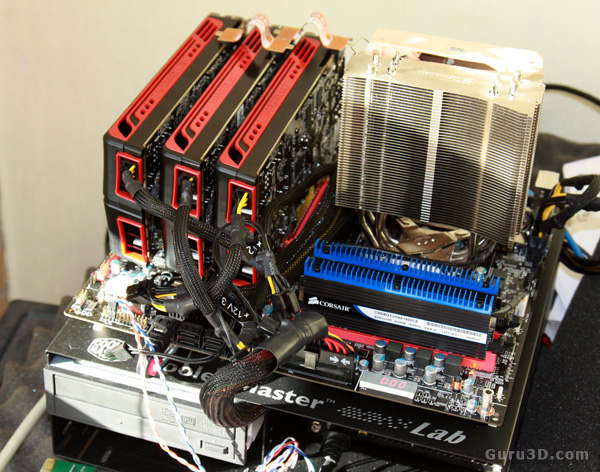
We'll be testing on a new P55 motherboard today, this in fact is the eVGA P55 Classified 200 -- yes the one with the gazillion PCIe slots. We use an unlocked engineering sample Core i7 870 processor and overclock it to roughly 3.75 GHz.
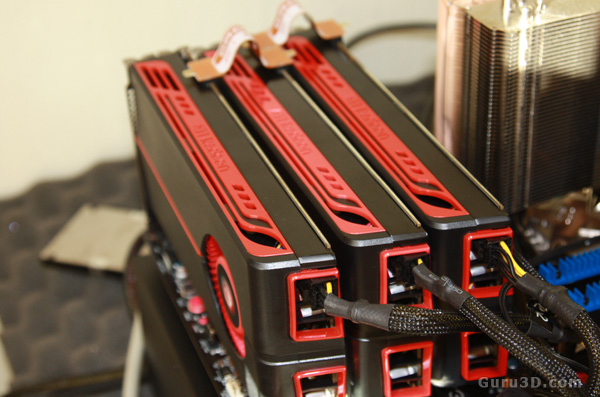
The advantage of a somewhat mainstream graphics card is that you'll only have one 6-pin power connector per card -- obviously you'll need three of them.
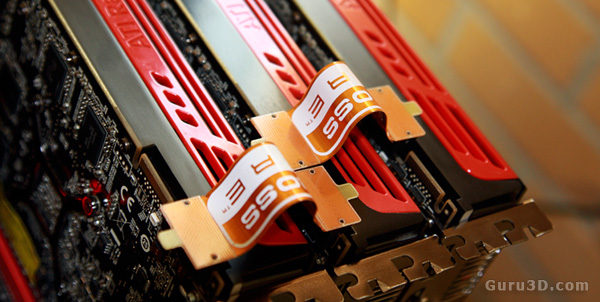
Here's how you connect three cards in CrossfireX mode.


13 pages 1 2 3 4 next »


Related Articles
Gigabyte Radeon HD 7790 2GB OC review
We test and review the Gigabyte Radeon HD 7790 2GB OC edition, also known under SKU code GV-R7790OC-2GD. We benchmark the product incl FCAT Frametimes. The new graphics card is intended to boost a little more performance into entry-level gaming. The Gigabyte HD7790 OC 2GB clocks in at 1075 MHz on the boost engine, packed with totally silent custom cooling.

MSI Radeon HD 7790 TurboDuo OC review
We test and review the MSI Radeon HD 7790 OC edition, also known under SKU code R7790-1GD5-OC incl FCAT Frametimes. The new graphics card is intended to boost a little more performance into entry-level gaming.

Radeon HD 7990 review
We review the new AMD Radeon HD 7990 including FCAT frametime measurements. The dual GPU product that you guys learned to know under codename Malta finally is released. AMD it doing it in style, two fully equipped Tahiti XT2 GPUs versus good yet silent cooling. In this review we'll look at the product, the architecture, the benchmarks, including frametime based FCAT measurements. Head on over towards our AMD Radeon HD 7990.

Club3D Radeon HD 7870 Joker review
We test and review the Club3D Radeon HD 7870 Joker, this is the much discussed 7870 card that in fact has a 7900 series GPU, the Tahiti LE. For a fair amount of money this series 7800 product now offers 7900 series performance. Armed with 2GB of graphics memory it hits a sweet spot gaming performance wise and to date it one of the more popular products in the mainstream segment. Let's check out the Club3D Radeon HD 7870 Joker.

Follow Guru3D on Google+ - Facebook - YouTube - Twitter © 2013