Installation and RW File Copy tests
Installation
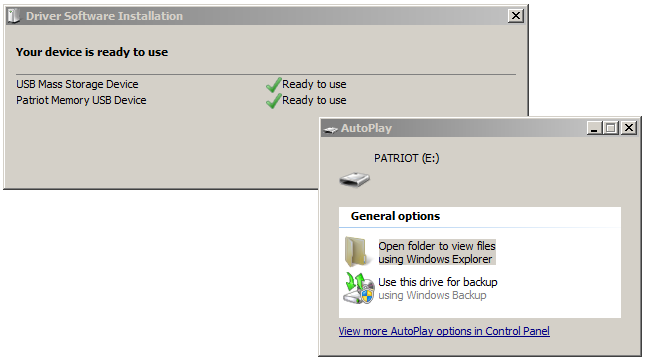
Nothing is required other then the fact that you need a working USB 3.0 host, just pop in the drive, Windows 7 will initialize and detect the drive like so.
We'll take a trawl around our most popular SSD benchmarks which is flash storage as well. Please do not compare a USB Flash drive to SSD results okay? It's a completely different thing with completely other usage. Small file transfers arent the kind of scenario youll regularly meet under real-world usage; by any standards.
Performance RW File Copy tests
In this round of benchmarks we start off with two new additions in our test suite, real-world file copy tests. Currently certain controllers benefit from compressed files, while others don't. Certain storage units hate small files, others work well with it. So it only makes sense to do some manual tests on that.
File copy write test - Slightly larger compressed files.
For this real-world file-copy test we take compressed data, like small JPG and MP3 files. We have them in random sizes from less than one KB up-to slightly larger 2MB files to emulate MP3 copying better (which most of you can relate to a notch better).
So we know that once we pass 16/32KB sizes, flash storage really hauls ass and speed up exponentially.
For this test, initially designed the stress the fastest SSDs we increased the workload here towards 3 GB with 4272 compressed files in total, with a maximum files-size of 2MB. So we drop a little over 4200 small files onto the the drive, copied from the RAMDISK and measure the amount in seconds it takes for the storage unit to deal with it.
Again, the files are being copied from the RAMDISK in the amount of seconds you see above towards the tested storage unit, lower is obviously better. The results where disappointing, and it has everything to do with the mix of small files within the array of files used for this test. Flash storage USB drives suck at these small files. This test is not what Flash disk storage is about as these are all small files queued up to write. Let's take a more realistic approach.
If you go all manual on the file copies and just copy large files towards the SS Magnum, that's where the power should be found:
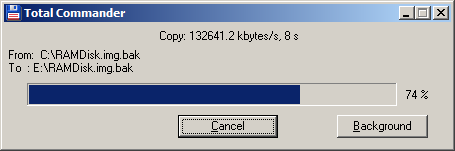
Here we copy a 4GB sized image towards the storage unit. The write performance here is 133 MB/sec. Reversed from the Magnum towards say the ramdisk, we near 200 MB/sec, that's all the difference in the world.
