
Guru3D.com
  • HOME
  • NEWS
    • Channels
    • Archive
    • Search
    • Submit
  • DOWNLOADS
    • New Downloads
    • Categories
    • Archive
    • Search
    • Submit
  • GAME REVIEWS
  • ARTICLES
    • Editorials
    • Guru3D VGA Charts
    • Rig of the Month
    • Join ROTM
    • PC Buyers Guide
    • Dated content
    • More Categories
  • HARDWARE REVIEWS
    • Videocards
    • Processors
    • Audio
    • Motherboards
    • Memory and Flash
    • SSD Storage
    • Chassis
    • Power Supply
    • Laptop and Mobile
    • Smartphone
    • Networking
    • Keyboard Mouse
    • Cooling
    • Knowledgebase
    • Search articles
    • More Categories
  • FORUMS
  • SEARCH
    • Search Articles
    • Search News
    • Search Files
  • NEWSLETTER
  • CONTACT

New Reviews
Gigabyte GeForce GTX 780 WindForce 3x OC review
GeForce GTX 780 SLI and Multi monitor review
GeForce GTX 780 review
OCZ Vertex 450 SSD review
Gigabyte GeForce GTX 650 Ti Boost OC WindForce 2X review
MSI Radeon HD 7790 TurboDuo OC review
Metro Last Light VGA Graphics Benchmark performance test
Noctua NH-U12S and NH-U14S review
ASUS GeForce GTX 670 DirectCU Mini review
OCZ Vertex 3.20 SSD review

New Downloads
GeForce 320.18 WHQL Driver Download
AMD Catalyst Application Profile Download 13.5 CAP1
MSI Afterburner 3.0.0 Beta 10 Download
PhysX System Software 9.13.0325 Download
GPU-Z Download 0.7.1
HWiNFO32 4.18 Download
HWiNFO64 4.18 Download
GeForce 320.14 BETA Driver Download
Nvidia Lifelike Human Face Rendering Tech Demo Download
3DMark Download v1.1.0


New Forum Topics
by: eighty1 help upgrading cpu mobo and some queries.by: Hilbert Hagedoorn GeForce GTX 780 reviewby: Stone Gargoyle Xbox World reveals Next Gen Xbox?by: Pill Monster 3D Mark 2013 Guru3D Recordsby: Pill Monster Ford Australia to shut down factoriesby: RedSeptember Call of Juarez - Gunslingerby: bishi Geforce GTX 780 Owners Clubby: Agent-A01 Geforce GTX TITAN Owner Clubby: Rob McClelland New PAX Creative Download section thread.by: Chillin Awesome Deal: Alan Wake Collectors Edition and American Nightmare - $1


Online Users
There are currently 2166 user(s) online:
Agonist, Assirra, burt, deltatux, Google, jbmcmillan, Koniakki, Live Search, MSN, RecluSe, UnrealGaming, Veeshush, Yahoo


Guru3D.com » Review » Overclocking the Radeon HD 4890 » Page 1

Overclocking the Radeon HD 4890

Posted by Hilbert Hagedoorn on: 04/03/2009 01:00 PM [ 0 comment(s) ]

Introduction
Tweet


Radeon HD 4890 Overclocking

This week the Radeon HD 4890 was released by ATI and as our reference article showed, it has a lot of overclocking potential. I mean seriously, it has a lot of headroom there which could results in 10% better performance on average.

Typically overclocking can be managed really well through the Catalyst control center, however .. the control center always has certain restriction as in 'how much' you can actually overclock. In this article we'll show you how you can overclock the easy way, with the help of this little application we make ourselves, Rivatuner.

This article is really simple as all we'll show you is, how to manage an overclock; and of course throw in a couple of additional benchmarks.

Overclocking & Tweaking
As most of you with most videocards know, you can apply a simple series of tricks to boost the overall performance a little. You can do this at two levels, namely tweaking by enabling registry or BIOS hacks, or very simple, tamper with Image Quality. And then there is overclocking, which will give you the best possible results by far.

What do we need?
One of the best tool for overclocking NVIDIA and ATI videocards is our own Rivatuner that you can download from our website. If you own an ATI or NVIDIA graphics card then the manufacturer actually has very nice built in options for you that can be found in the display driver properties.

Where should we go?
Overclocking: By increasing the frequency of the videocard's memory and GPU, we can make the videocard increase its calculation clock cycles per second. It sounds hard, but it really can be done in less than a few minutes. I always tend to recommend to novice users and beginners not to increase the frequency any higher then 5% (in total) of the core and memory clock MHz.

Next page please, where we'll learn you to overclock the proper way.
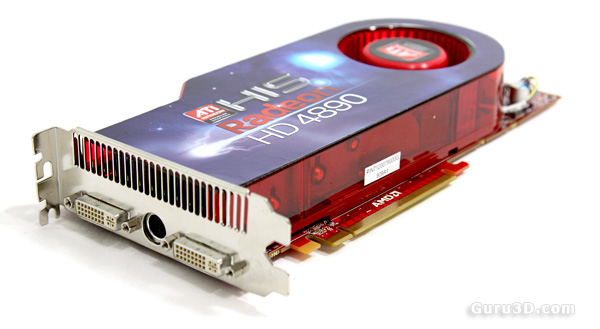
ATI Radeon HD 4890


7 pages 1 2 3 4 next »


Guru3D.com » Articles » Overclocking the Radeon HD 4890 » Page 1

Related Articles
GeForce GTX Titan Overclock Guide
Today an article slash guide dedicated on overclocking the GeForce GTX Titan. Can we take it to 1100 MHz ? Sure we can. Armed with a new trick or two overclocking will never be the same though.

GeForce GTX 680 Overclock Guide
Today an article dedicated on overclocking the GeForce GTX 680. Can we take it to 1300 MHz ? Yes we can.

Radeon HD 7870 Overclock Guide
This is a Radeon HD 7870 Overclock Guide. We'll overclock based on a mild voltage tweak. By doing so we drive the R7870 into R7900 series performance. All you need is some free software and a little time to precisely determine and pinpoint your maximum yet stable overclock.

Radeon HD 7950 Overclock Guide
We take a Radeon HD 7950 overclock it the normal way and then voltage tweaked. So that way we will demonstrate not one, but two maximum overclock conditions alongside TDP, heat, noise and performance levels.

Follow Guru3D on Google+ - Facebook - YouTube - Twitter © 2013