Guru3D.com
  • HOME
  • NEWS
    • Channels
    • Archive
    • Search
    • Submit
  • DOWNLOADS
    • New Downloads
    • Categories
    • Archive
    • Search
    • Submit
  • GAME REVIEWS
  • ARTICLES
    • Editorials
    • Guru3D VGA Charts
    • Rig of the Month
    • Join ROTM
    • PC Buyers Guide
    • Dated content
    • More Categories
  • HARDWARE REVIEWS
    • Videocards
    • Processors
    • Audio
    • Motherboards
    • Memory and Flash
    • SSD Storage
    • Chassis
    • Power Supply
    • Laptop and Mobile
    • Smartphone
    • Networking
    • Keyboard Mouse
    • Cooling
    • Knowledgebase
    • Search articles
    • More Categories
  • FORUMS
  • SEARCH
    • Search Articles
    • Search News
    • Search Files
  • NEWSLETTER
  • CONTACT

New Reviews
Gigabyte GeForce GTX 650 Ti Boost OC WindForce 2X review
MSI Radeon HD 7790 TurboDuo OC review
Metro Last Light VGA Graphics Benchmark performance test
Noctua NH-U12S and NH-U14S review
ASUS GeForce GTX 670 DirectCU Mini review
OCZ Vertex 3.20 SSD review
Gigabyte Radeon HD 7790 2GB OC review
Cooler Master Eisberg 240L Prestige review
Guru3D and OCZ Contest - PC Power 1200W PSU Giveaway
MSI GeForce GTX 650 Ti BOOST OC review

New Downloads
MSI Afterburner 3.0.0 Beta 10 Download
PhysX System Software 9.13.0325 Download
GPU-Z Download 0.7.1
HWiNFO32 4.18 Download
HWiNFO64 4.18 Download
GeForce 320.14 BETA Driver Download
Nvidia Lifelike Human Face Rendering Tech Demo Download
3DMark Download v1.1.0
XBMC Media Center Download 12.0 2
RTSS Rivatuner Statistics Server Download v5.1.1


New Forum Topics
by: villa_youth Metro: Last Lightby: jeffmorris Replace parts in old computer?by: EspHack Dexter final seasonby: WhiteLightning Cops shoot 2 as 'soldier is beheaded' in suspected terrorist attackby: RedSeptember Farscapeby: WhiteLightning Sony to Unveil PS3 Successor !!!by: CeeJay.dk SweetFX Shader Suite release and discussion thread #3by: Stone Gargoyle FIFA 14 PC won't use new Ignite engineby: SlackerITGuy What's the Radeon experience in BF3?by: Lendrich Drivers for AMD Radeon HD 7670M (Toshiba)


Online Users
There are currently 1803 user(s) online:
elkosith, Google, heffeque, Live Search, MM10X, MSN, PuddingWagon, Titan29, Yahoo, yasamoka


Guru3D.com » Review » Corsair Obsidian 650D review » Page 5

Corsair Obsidian 650D review

Posted by Hilbert Hagedoorn on: 04/24/2011 01:00 PM [ 0 comment(s) ]

Product Showcase
Tweet


Corsair Obsidian 650D

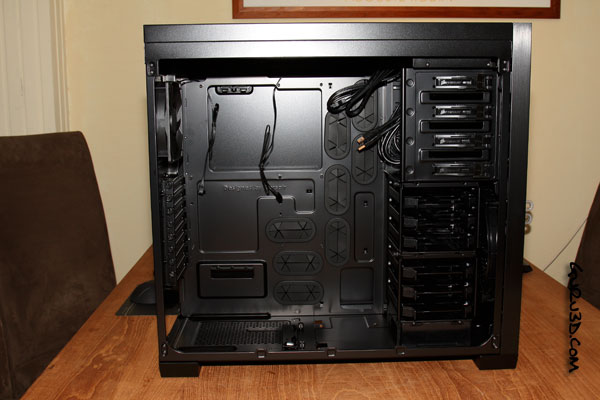
Internals then, since the photos are reeeeally dark I'm enabling flash. First impression, that's just a lot of room to work in for a mid sized tower alright. The second thought would be the all black design, including cables and connectors. Even the grommet holes have black rubber inlays to hide cabling, yes, cable management is a primary feature of the chassis. You can make it all really clean and tidy.
Corsair Obsidian 650D

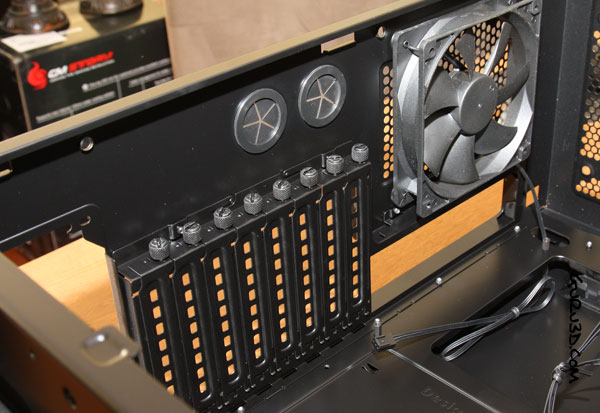
You'll get 8 PCI slots to play around with so in theory you can house up-to three graphics cards in here, four if you are lucky. You secure the graphics cards or other cards with a thumbscrew. Above it, two round holes with rubber inlays. These could be used for LCS tubing, but are intended to route the front panel USB 3.0 connector cables towards the rear IO (where USB 3.0 connectors are located).
Corsair Obsidian 650D

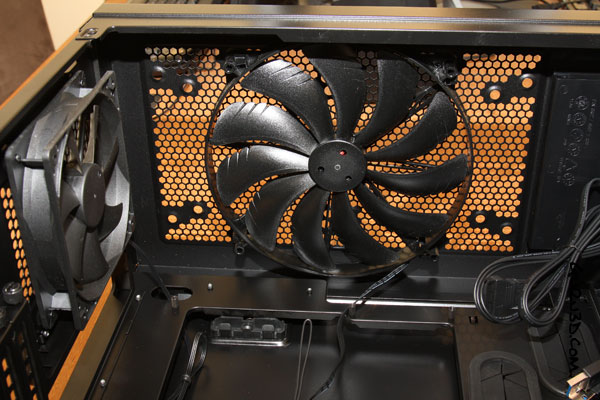
At the top side we can see the 120mm and 200mm fans, these are included and installed for you already. In the upper mesh you'll notice that mounting holes for other fan and radiator solutions have already been prepped.
Corsair Obsidian 650D

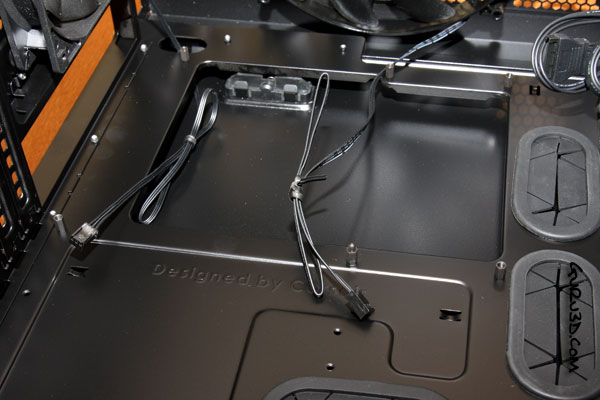
A good and popular trend these days is to make a big gaping hole in the motherboard tray. This actually is a CPU backplate cutout which allows you to remove and install a new CPU cooler much easier.

Typically you'd need to take out the motherboard to install a new cooler, now you can access it from both sides without that unpleasant experience of removing a motherboard from the chassis. We can also see the gaps in the tray with the rubber inlays here a tad better (grommet holes), here you can route your cabling through, and the rubber inlays keep things clean and tidy looking.


9 pages « < 4 5 6 7 next »


Guru3D.com » Articles » Corsair Obsidian 650D review » Page 5

Related Articles
Corsair Obsidian 350D review
We review a new chassis from Corsair, it Obsidian 350D. It is the mini-me version of the new Obsidian 900D chassis. Not mid, not full, mini and this intended for small form factor PCs. Now the product might be tagged as mini, the details and features however are grand. Armed with a price much better then the 900D this might be the product a lot of you are on the lookout for.

Corsair Voyager Air review
We review the Voyager Air, it is a portable storage unit allows you to connect it towards USB 3.0 and Ethernet, but it also includes WIFI support and it actually comes on a 100 GB HDD model as well. This great looking device might just be what the doctor to move or stream your content from.

Corsair Obsidian 900D review
We test and review the all new Corsair Obsidian 900D chassis. Not, mid, not full heck, this is a super tower. Probably one of the biggest products you have seen to date. It is highly configurable has hidden options in every corner and a craftsmanship that will stun you.

Corsair H90 review
A test and review the Corsair H90 liquid cooler. The Hydro Series H90 is Corsairs first 140mm Liquid Cooling solution that is bound to draw some impressive heat from your processor.

Follow Guru3D on Google+ - Facebook - YouTube - Twitter © 2013