Guru3D.com
  • HOME
  • NEWS
    • Channels
    • Archive
    • Search
    • Submit
  • DOWNLOADS
    • New Downloads
    • Categories
    • Archive
    • Search
    • Submit
  • GAME REVIEWS
  • ARTICLES
    • Editorials
    • Guru3D VGA Charts
    • Rig of the Month
    • Join ROTM
    • PC Buyers Guide
    • Dated content
    • More Categories
  • HARDWARE REVIEWS
    • Videocards
    • Processors
    • Audio
    • Motherboards
    • Memory and Flash
    • SSD Storage
    • Chassis
    • Power Supply
    • Laptop and Mobile
    • Smartphone
    • Networking
    • Keyboard Mouse
    • Cooling
    • Knowledgebase
    • Search articles
    • More Categories
  • FORUMS
  • SEARCH
    • Search Articles
    • Search News
    • Search Files
  • NEWSLETTER
  • CONTACT

New Reviews
Gigabyte GeForce GTX 650 Ti Boost OC WindForce 2X review
MSI Radeon HD 7790 TurboDuo OC review
Metro Last Light VGA Graphics Benchmark performance test
Noctua NH-U12S and NH-U14S review
ASUS GeForce GTX 670 DirectCU Mini review
OCZ Vertex 3.20 SSD review
Gigabyte Radeon HD 7790 2GB OC review
Cooler Master Eisberg 240L Prestige review
Guru3D and OCZ Contest - PC Power 1200W PSU Giveaway
MSI GeForce GTX 650 Ti BOOST OC review

New Downloads
MSI Afterburner 3.0.0 Beta 10 Download
PhysX System Software 9.13.0325 Download
GPU-Z Download 0.7.1
HWiNFO32 4.18 Download
HWiNFO64 4.18 Download
GeForce 320.14 BETA Driver Download
Nvidia Lifelike Human Face Rendering Tech Demo Download
3DMark Download v1.1.0
XBMC Media Center Download 12.0 2
RTSS Rivatuner Statistics Server Download v5.1.1


New Forum Topics
by: Shinjiku Evga SC 660 TI 3B BARELY outperforming my 6950by: RedSeptember Call of Juarez - Gunslingerby: bishi ASUS 311.64 driversby: Hilbert Hagedoorn NVIDIA GeForce GTX 780, GTX 770 and GTX 760 Tiby: hallryu FX-83** Owners club - Discussion & overclockingby: Glidefan Vehicles of Guru3D thread #2by: StealBalls Question about 12v rails and which PSUby: Sukovsky Change GTX 680 to 7970 DirectCU2?by: Punisher64 i7 940 Overclock Helpby: Stereophonics Upgrade advice on two year old machine


Online Users
There are currently 2387 user(s) online:
Chouji, Doug, eclap, EyesLikeSkies, Google, GSDragoon, MSN, NeoElNino, polil91, PopcornMachine, smashly, stojo, usoldier, Yahoo, yasamoka


Guru3D.com » Review » Core i7 Multi-GPU SLI Crossfire Game performance review » Page 2

Core i7 Multi-GPU SLI Crossfire Game performance review

Posted by Hilbert Hagedoorn on: 11/02/2008 02:00 PM [ 0 comment(s) ]

2 - Examining the dark matter
Tweet


Examining the dark matter

To be able to understand what we are doing today we need to briefly take you through some of the key components used for Lucifer. So I explained that we'll be building a DIY (Do It Yourself) X58 based system and sidetrack completely from the reference kit that Intel has been sending around.

So before we start, some custom parts we will be using I want to show to you first:

  • Motherboard -- ASUS X58 Rampage 2 Extreme
  • Memory -- OCZ PC3 16000 - Platinum Edition (2000 MHz 9-9-9)
  • Cooling -- Noctua NH-C12P heapipe cooler with Nehalem mounting system.

These are some pretty nifty parts, and as such I wanted to talk you through them. First the mainboard, memory and then cooling.

ASUS X58 Rampage 2 Extreme
Core i7 - Multi GPU performance

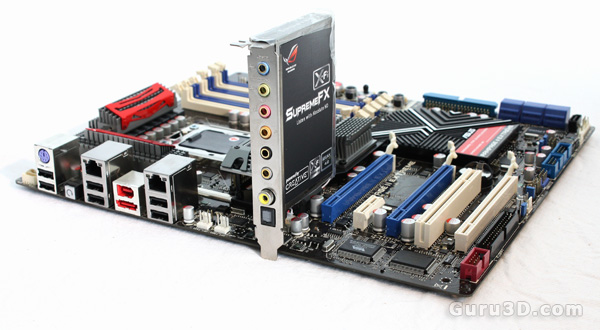
Guys, meet the ASUS X58 Rampage 2 Extreme. Since this is a GPU performance article, we won't go in-depth here but I think I can sum it up in one line for you: I actually fell in love with a motherboard. Prepare to get a woody. Designed for a small enthusiast market and likely manufactured with limited production numbers this is the top of the line ASUS X58 based motherboard. It comes from the ASUS Republic of Gamers (ROG) design group.

This motherboard is no laughing matter. The board has a multi-phase power management system, 16 phases for the CPU and 3 phases each for QPI/DRAM. You probably noticed it already, but the motherboard has this Creative labs X-Fi board on there. That actually comes with the motherboard itself and is called SupremeFX X-Fi. SupremeFX X-Fi utilizes established X-Fi technologies such as CMSS-3D and EAX to deliver multi-channel audio.
Core i7 - Multi GPU performance

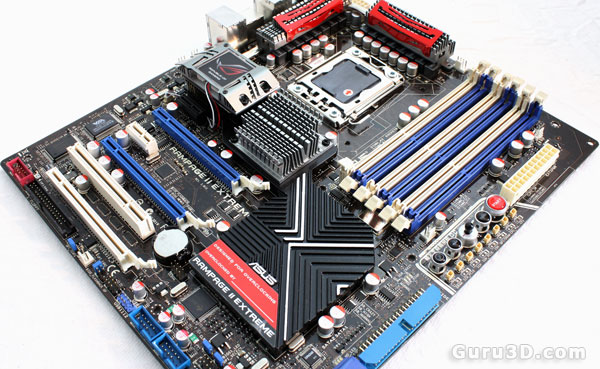
Do you see that hidden fan there, right above the chipset (Northbridge) heatsink? That's a VTT CPU Power Card ensuring some hefty overclocking. Next to the scrumptious six DIMM slots notice a set of controls and connectors on the edge of the board labeled 'Extreme OC'. This is the iROG microcontroller -- there's even a little joystick there, which enables you to make real-time changes to your PC's core frequency, voltage and other parameters using the joystick-like control on the motherboard itself.

Much like the ASUS P6T Deluxe (which we'll have a review on this week), the Rampage Extreme II has three PCI-E graphics slots, the Rampage Extreme II however can handle 3-way SLI and CrossFire.

Just below the Northbridge fan we can see the black PCIE 1x slot for the SupremeFX daughter-board, and below that, three PCIe 16x slots for multiple graphics card setups. Two graphics cards (blue slots) will both provide x16 bandwidth, but when running Tri-SLI or three cards in CrossfireX mode the top slot provides 16x bandwidth and the remaining two provide 8x. Additionally, there is one remaining PCIe 1x and PCI slot.

The Rampage II Extreme has 1x IEEE1394; 1x floppy drive; 3x SATA (including extra 1394 module) ports and the front panel connectors. An interesting fact is that the Rampage II Extreme has a dual BIOS. There is a jumper available for selecting which BIOS you are going to boot from. Right, let me end it before it turns into a full motherboard review.

Very expensive, but this might be the best designed motherboard I've ever had my hands on.


20 pages 1 2 3 4 next »


Guru3D.com » Articles » Core i7 Multi-GPU SLI Crossfire Game performance review » Page 2

Related Articles
Core i7 3770K review with Z77
We review the Core i7 3770K Ivy bridge processors alongside Intel's Z77 motherboard. Will Ivy Bridge be the processor series everything you expected? Go find out in this extensive review here at Guru3D.

Core i7 3820 processor review
We review the Core i7 3820 processor. The chip features four computing cores with Hyper-Threading support working at 3.6GHz (3.9GHz max Turbo), 10MB of Level 3 cache memory, a quad-channel memory controller, and a built-in 40-lane PCI Express 3.0 controller.

Core i7 3960X processor and MSI X79A-GD65 review
Today an article covering the Intel Core i7-3960X (Sandy Bridge-E) and X79 based motherboards. An update to the true high-end six-core processor series aimed at consumers. we test with a final sample X79 motherboard from MSI. This article will also review the MSI X79A-GD65 8D. Next to that the fellas from G.Skill provided a Sandy-Bridge-E quad channel memory kit that blew us of our feet, 16GB G.Skill RipjawsZ series memory that with the flick of a BIOS setting to XMP runs stable at 2133 MHz in quad channel.

Core i5 2500K and Core i7 2600K review
Today we test and review Sandy Bridge, the Intel Core i7-2600K and Intel Core i5-2500K processors. We will pair the 2600K processor with the Intel Desktop Motherboard DP67BG and also run a test with the Intel Core i5-2500K processor on a Intel DH67BL motherboard

Follow Guru3D on Google+ - Facebook - YouTube - Twitter © 2013