Graphics card noise levels
Graphics card Noise Levels
When graphics cards produce a lot of heat, usually that heat needs to be transported away from the hot core as fast as possible. Often you'll see massive active fan solutions that can indeed get rid of the heat, yet all the fans these days make the PC a noisy son of a gun. Do remember that the test we do is extremely subjective. We bought a certified dBA meter and will start measuring how many dBA originate from the PC. Why is this subjective you ask? Well, there is always noise in the background, from the streets, from the HD, PSU fan etc etc, so this is by a mile or two an imprecise measurement. You could only achieve objective measurement in a sound test chamber.
The human hearing system has different sensitivities at different frequencies. This means that the perception of noise is not at all equal at every frequency. Noise with significant measured levels (in dB) at high or low frequencies will not be as annoying as it would be when its energy is concentrated in the middle frequencies. In other words, the measured noise levels in dB will not reflect the actual human perception of the loudness of the noise. That's why we measure the dBA level. A specific circuit is added to the sound level meter to correct its reading in regard to this concept. This reading is the noise level in dBA. The letter A is added to indicate the correction that was made in the measurement. Frequencies below 1kHz and above 6kHz are attenuated, whereas frequencies between 1kHz and 6kHz are amplified by the A weighting.
| TYPICAL SOUND LEVELS | ||
| Jet takeoff (200 feet) | 120 dBA | |
| Construction Site | 110 dBA | Intolerable |
| Shout (5 feet) | 100 dBA | |
| Heavy truck (50 feet) | 90 dBA | Very noisy |
| Urban street | 80 dBA | |
| Automobile interior | 70 dBA | Noisy |
| Normal conversation (3 feet) | 60 dBA | |
| Office, classroom | 50 dBA | Moderate |
| Living room | 40 dBA | |
| Bedroom at night | 30 dBA | Quiet |
| Broadcast sstudio | 20 dBA | |
| Rustling leaves | 10 dBA | Barely audible |
There's a lot of differences in measurements amongst websites. Some even place the dBA meter 10cm away from the card. Considering that's not where your ear is located, we do it our way.
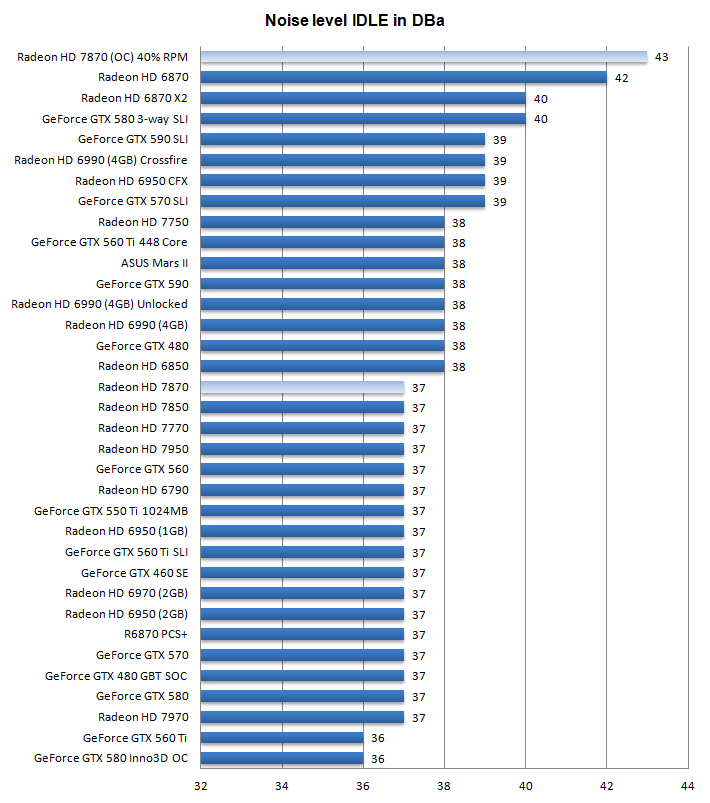
For each dBA test we close the PC/chassis and move the dBA gun 75 cm away from the PC. Roughly the same proximity you'll have from a PC in a real-world situation. Above, the IDLE (desktop mode) results where the GPU hardly has to do anything.
Now the HIGH IDLE results with the voltage tweaked card is due to the fact that we forced fan RPM at 65% continuously. That value can be anything you wish of course. But we wanted optimal cooling.
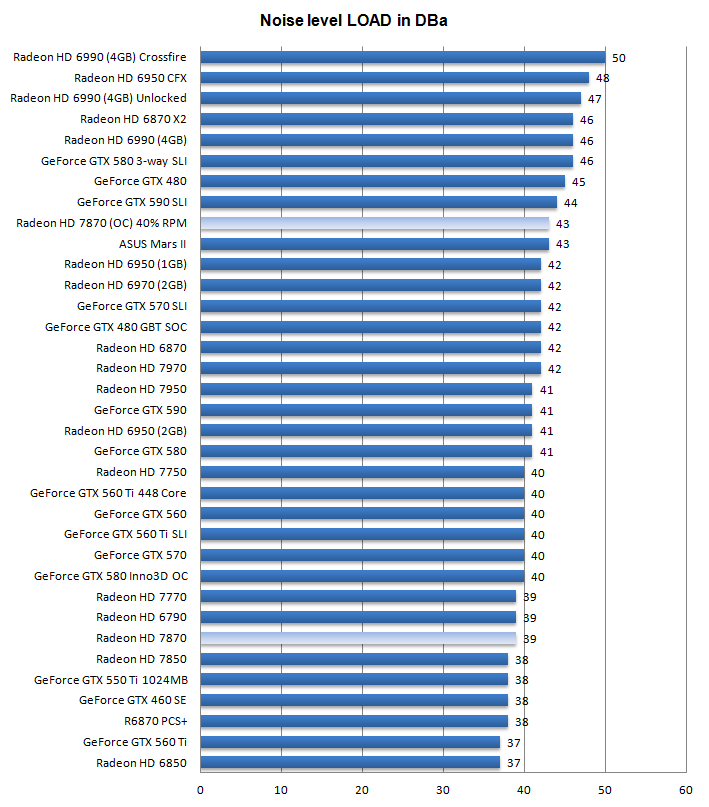
For the card in a fully stressed status (in-game) with the overclock applied we measure 43 DBA almost touching 44 DBa, now that is quite audible. The reason for this is that we increased and forced fan RPM towards 40%. The plus is that temps are great, the downside .. added noise .
So my advise is, try to find an RPM level that is acceptable for you, and then see how far you can overclock based on that noise level.
