Guru3D.com
  • HOME
  • NEWS
    • Channels
    • Archive
    • Search
    • Submit
  • DOWNLOADS
    • New Downloads
    • Categories
    • Archive
    • Search
    • Submit
  • GAME REVIEWS
  • ARTICLES
    • Editorials
    • Guru3D VGA Charts
    • Rig of the Month
    • Join ROTM
    • PC Buyers Guide
    • Dated content
    • More Categories
  • HARDWARE REVIEWS
    • Videocards
    • Processors
    • Audio
    • Motherboards
    • Memory and Flash
    • SSD Storage
    • Chassis
    • Power Supply
    • Laptop and Mobile
    • Smartphone
    • Networking
    • Keyboard Mouse
    • Cooling
    • Knowledgebase
    • Search articles
    • More Categories
  • FORUMS
  • SEARCH
    • Search Articles
    • Search News
    • Search Files
  • NEWSLETTER
  • CONTACT

New Reviews
Gigabyte GeForce GTX 650 Ti Boost OC WindForce 2X review
MSI Radeon HD 7790 TurboDuo OC review
Metro Last Light VGA Graphics Benchmark performance test
Noctua NH-U12S and NH-U14S review
ASUS GeForce GTX 670 DirectCU Mini review
OCZ Vertex 3.20 SSD review
Gigabyte Radeon HD 7790 2GB OC review
Cooler Master Eisberg 240L Prestige review
Guru3D and OCZ Contest - PC Power 1200W PSU Giveaway
MSI GeForce GTX 650 Ti BOOST OC review

New Downloads
GPU-Z Download 0.7.1
HWiNFO32 4.18 Download
HWiNFO64 4.18 Download
GeForce 320.14 BETA Driver Download
Nvidia Lifelike Human Face Rendering Tech Demo Download
3DMark Download v1.1.0
XBMC Media Center Download 12.0 2
RTSS Rivatuner Statistics Server Download v5.1.1
AS SSD Benchmark Download v1.7.4739.38088
AMD Catalyst Application Profile Download 13.4 CAP1


New Forum Topics
by: xgs Need help getting my gaming rig build started. ($1750)by: Hilbert Hagedoorn PlayStation 4 See it First at E3 Teaserby: anf I love my nexus 7by: Stone Gargoyle Xbox World reveals Next Gen Xbox?by: Hilbert Hagedoorn Windows 8.1 will be a free upgradeby: BABA-The Hacker AMD Radeon HD 9970 Leaked detailsby: Watcher 18-year-old’s breakthrough invention can recharge phones in secondsby: saminator99 Nvidia Surround 3 monitors issuesby: QMarks how to update switchable Radeon/Intel graphicsby: kens30 P67 an Z77 owners..


Online Users
There are currently 2502 user(s) online:
BahamutxD, caleb59, ceesay, cliffgamerz, CronoGraal, Darren Hodgson, DM789, ESlik, Google, Live Search, Memorian, MSN, Natslx, Neo Cyrus, pbvider, PCElite, PhazeDelta1, rl66, Yahoo


Guru3D.com » Review » MSI GeForce GTX 560 Ti HAWK review » Page 21

MSI GeForce GTX 560 Ti HAWK review

Posted by Hilbert Hagedoorn on: 07/04/2011 01:00 PM [ 0 comment(s) ]

Graphics card Overclocking
Tweet


Graphics card Overclocking

As most of you know, with most videocards you can apply a simple series of tricks to boost the overall performance a little. You can do this at two levels, namely tweaking by enabling registry or BIOS hacks, or very simply tampering with Image Quality. And then there is overclocking, which will give you the best possible results by far.

What do we need?
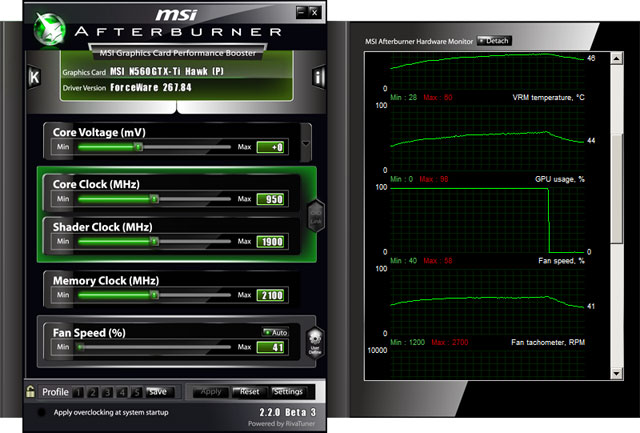
One of the best tools for overclocking NVIDIA and ATI videocards is our own AfterBurner which will work with 90% of the graphics cards out there. We can really recommend it, download here.
MSI GTX560 Ti HAWK

Where should we go?
Overclocking: By increasing the frequency of the videocard's memory and GPU, we can make the videocard increase its calculation clock cycles per second. It sounds hard, but it really can be done in less than a few minutes. I always tend to recommend to novice users and beginners, to not increase the frequency any higher than 5% on the core and memory clock. Example: If your card runs at 600 MHz (which is pretty common these days) then I suggest that you don't increase the frequency any higher than 30 to 50 MHz.

More advanced users push the frequency often way higher. Usually when your 3D graphics start to show artifacts such as white dots ("snow"), you should back down 10-15 MHz and leave it at that. Usually when you are overclocking too hard, it'll start to show artifacts, empty polygons or it will even freeze. Carefully find that limit and then back down at least 20 MHz from the moment you notice an artifact. Look carefully and observe well. I really wouldn't know why you need to overclock today's tested card anyway, but we'll still show it.

All in all... do it at your own risk.

Original This sample Overclocked + 100Mv GPU
Core Clock: 822MHz Core Clock: 950MHz Core Clock: 1029MHz
Shader Clock: 1644MHz Shader Clock:1900MHz Shader Clock: 2058MHz
Memory Clock: 3800MHz Memory Clock:4200MHz Memory Clock: 4500MHz

Overclocking wise, the card is already overclocked really nicely, but will allow to be clocked a bit higher to roughly 975~990MHz on the core without voltage tweaking. But if you purchase a card like this, we doubt you'll not be tweaking the living bejezus out of it. So we applied a GPU voltage 100Mv extra the overclock experience will go up a little.

We reached a stable 1029 MHz on the core but did have some leash to 1050 MHz left. But yeah, tweak a little and the 1 GHz barrier will become an option. The downside of the voltage tweak however is a much louder graphics card as it will need to deal with more residual heat. It is a completely different beast noise wise, be prepared for that.

Anyway here's what that does towards overall game performance, the GTX 500 series really likes overclocking and that shows in the numbers.

Above, COD MWF2, maxed out image quality settings as before with 4xAA. With so much GPU power requested by the game, we can actually measure the overclock pretty well.

Above, Battlefield Bad Company 2, maxed out image quality settings as before with 8xAA 16xAF. Here up-to 1920x1200 we run into massive CPU limitation. Once you are freed from that, perf boost upwards alright.

Above, 3DMark 11 - the Performance test and score. As you can see a nice additional bump in this very GPU limiting title, lovely.


22 pages « < 19 20 21 22


Guru3D.com » Articles » MSI GeForce GTX 560 Ti HAWK review » Page 21

Related Articles
MSI GeForce GTX 650 Ti BOOST OC review
In this article we review the MSI GeForce GTX 650 Ti BOOST OC edition review with that OC for a factory tweak. The product is customized with a new PCB, cooling and a few tweaks, it has 2GB of memory with both that memory and the core base-clock slightly overclocked. Overall an interesting product at an interesting price in the lower segment of the mainstream market.

MSI GeForce GTX 660 HAWK review
MSI GeForce GTX 660 HAWK we test and review the graphics card also located under SKU N660 HAWK.

MSI GeForce GTX 650 Ti review
We review the MSI GeForce GTX 650 Ti Power Edition. MSI applies a custom PCB and their Cyclone II cooler. Next to that you receive a factory overclock right out of the box. Let's check it out shall we ?

MSI GeForce GTX 660 TwinFrozr III review
We review the MSI GeForce GTX 660 TwinFrozr III. it's already factory overclocked for you, comes in a custom design PCB out and is custom cooled. Combined with MSI's Military component usage you may expect something sturdy and well performing. lets check out this review.

Follow Guru3D on Google+ - Facebook - YouTube - Twitter © 2013