Guru3D.com
  • HOME
  • NEWS
    • Channels
    • Archive
    • Search
    • Submit
  • DOWNLOADS
    • New Downloads
    • Categories
    • Archive
    • Search
    • Submit
  • GAME REVIEWS
  • ARTICLES
    • Editorials
    • Guru3D VGA Charts
    • Rig of the Month
    • Join ROTM
    • PC Buyers Guide
    • Dated content
    • More Categories
  • HARDWARE REVIEWS
    • Videocards
    • Processors
    • Audio
    • Motherboards
    • Memory and Flash
    • SSD Storage
    • Chassis
    • Power Supply
    • Laptop and Mobile
    • Smartphone
    • Networking
    • Keyboard Mouse
    • Cooling
    • Knowledgebase
    • Search articles
    • More Categories
  • FORUMS
  • SEARCH
    • Search Articles
    • Search News
    • Search Files
  • NEWSLETTER
  • CONTACT

New Reviews
MSI Radeon HD 7790 TurboDuo OC review
Metro Last Light VGA Graphics Benchmark performance test
Noctua NH-U12S and NH-U14S review
ASUS GeForce GTX 670 DirectCU Mini review
OCZ Vertex 3.20 SSD review
Cooler Master Eisberg 240L Prestige review
Guru3D and OCZ Contest - PC Power 1200W PSU Giveaway
MSI GeForce GTX 650 Ti BOOST OC review
ASUS ROG ORION PRO Gaming Headset Review
Guru3D Rig of the Month - April 2013

New Downloads
GPU-Z Download 0.7.1
HWiNFO32 4.18 Download
HWiNFO64 4.18 Download
GeForce 320.14 BETA Driver Download
Nvidia Lifelike Human Face Rendering Tech Demo Download
3DMark Download v1.1.0
XBMC Media Center Download 12.0 2
RTSS Rivatuner Statistics Server Download v5.1.1
AS SSD Benchmark Download v1.7.4739.38088
AMD Catalyst Application Profile Download 13.4 CAP1


New Forum Topics
by: ignasx12 Gtx680 topby: Pigchild Can't get past 4.4Ghz. Please review need advice.by: The_Fool Need Advice on Fuel Injectorsby: Hilbert Hagedoorn RadeonPro BETA (Automating 3D Settings) #2by: John Vault of Fail Rev. 2 (new rules - RTFM!)by: FULMTL Have you ever pledged toward a Kickstarter project?by: tsunami231 Multi OS setup questionsby: Sukovsky Change GTX 680 to 7970 DirectCU2?by: FlawleZ Crate Entertainment's - Grim Dawnby: villa_youth Metro: Last Light


Online Users
There are currently 2846 user(s) online:
Darkiee, dr.noob, Google, Icanium, iCroW, Live Search, matrixer, MSN, Scoica, Smugl, Uncle Dude, Yahoo


Guru3D.com » Review » World in Conflict (PC) performance review » Page 5

World in Conflict (PC) performance review

Posted by Hilbert Hagedoorn on: 09/21/2007 01:00 PM [ 0 comment(s) ]

Page 5
Tweet

On this page we'll have a look at the performance with in-game the image quality set at "Very High"

World in Conflict - Very High image quality 1280x1024

Imaging spending 600 bucks on a GeForce 8800 Ultra, you select 1280x1024 and see a framerate of merely 37 FPS. Well, imagine this then, things will only get worse from here on. In any case you'll need a GeForce 8800 GTS 640 class graphics or higher adapter to be able to utilize the Very high IQ mode. Mind you that 4xAA and 4xAF is enabled here. Forfeiting AA however resulted in a very minor performance difference.

World in Conflict - Very High image quality 1600x1200

Indeed, a GeForce 8800 GTX is pretty much your minimum required graphics card at 1600x1200. For those that noticed, I ran that 8800 GTS 320 MB test three times to be sure including a re-installation of the driver, but the results matched time after time. I'm pretty confident it's a driver bug though.

Do we even dare try 2560x1600?

World in Conflict - Very High image quality 2560x1600

Of course we do. As you can see, even the GeForce 8800 Ultra at 2560x1600 can't even refresh it's harshly desired pixels fast enough at this resolution. Here's your chance to finally show off your SLI rig though.

A couple of things matter in this game. Better visuals definitely equals a higher frame buffer. If you have a 512 MB graphics card you'll notice a difference in performance versus quality. Also what we noticed was a little CPU limitation. We checked and the game definitely is multi-threading, both cores of our CPU where utilized. So it pays to have a good performing CPU in this game, big-time.
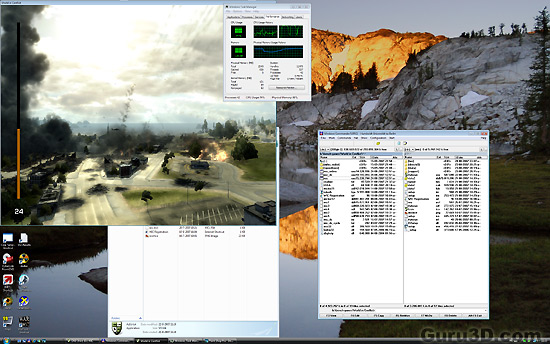
World in Conflict Graphics (PC) Performance overview
In the screenshot above you can observe roughly 70-80% CPU utilization; both cores are active and working in this game.

Alright guys and gals, this concludes this mini article on World in Conflict. I hope you now at the very least have a brief idea what to expect. This game truly is awesome in many ways, and future graphics cards will only complement this game. The graphics are ahead of the hardware for a change, but luckily you get to play around with IQ options and a bucket full of configurable features so that the game will play on any system.

From that point of view, with future graphics cards things can only get better !

Signing off,

Hilbert


5 pages 1 2 3 4 5


Guru3D.com » Articles » World in Conflict (PC) performance review » Page 5

Related Articles
World in Conflict (PC) performance review
World in Conflict (PC) graphics performance review with ten DX9 and DX10 class graphics cards and various image quality settings and resolutions.

Follow Guru3D on Google+ - Facebook - YouTube - Twitter © 2013