Guru3D.com
  • HOME
  • NEWS
    • Channels
    • Archive
    • Search
    • Submit
  • DOWNLOADS
    • New Downloads
    • Categories
    • Archive
    • Search
    • Submit
  • GAME REVIEWS
  • ARTICLES
    • Editorials
    • Guru3D VGA Charts
    • Rig of the Month
    • Join ROTM
    • PC Buyers Guide
    • Dated content
    • More Categories
  • HARDWARE REVIEWS
    • Videocards
    • Processors
    • Audio
    • Motherboards
    • Memory and Flash
    • SSD Storage
    • Chassis
    • Power Supply
    • Laptop and Mobile
    • Smartphone
    • Networking
    • Keyboard Mouse
    • Cooling
    • Knowledgebase
    • Search articles
    • More Categories
  • FORUMS
  • SEARCH
    • Search Articles
    • Search News
    • Search Files
  • NEWSLETTER
  • CONTACT

New Reviews
EVGA GeForce GTX 780 SC ACX review
Gigabyte GeForce GTX 780 WindForce 3x OC review
GeForce GTX 780 SLI and Multi monitor review
GeForce GTX 780 review
OCZ Vertex 450 SSD review
Gigabyte GeForce GTX 650 Ti Boost OC WindForce 2X review
MSI Radeon HD 7790 TurboDuo OC review
Metro Last Light VGA Graphics Benchmark performance test
Noctua NH-U12S and NH-U14S review
ASUS GeForce GTX 670 DirectCU Mini review

New Downloads
PrecisionX Download Version 4.2.0
GeForce 320.18 WHQL Driver Download
AMD Catalyst Application Profile Download 13.5 CAP1
MSI Afterburner 3.0.0 Beta 10 Download
PhysX System Software 9.13.0325 Download
GPU-Z Download 0.7.1
HWiNFO32 4.18 Download
HWiNFO64 4.18 Download
GeForce 320.14 BETA Driver Download
Nvidia Lifelike Human Face Rendering Tech Demo Download


New Forum Topics
by: Hilbert Hagedoorn Metro Last Light VGA performance benchmarksby: bishi Geforce GTX 780 Owners Clubby: alonbl Help 3770k OC'ing strange high tempsby: aircool Battlefield 3 (Official Thread) Pt. 3by: Moejoe Geforce 9800GT not compatible?by: The Fitter My Guilty Pleasureby: Jonnyboy Artifacts with BF3by: Johnsmith2222 New Build. Need parts advice/vet.by: dellon132 ATI Catalyst 12.11 Beta 11 Modded driver For Legacy GPUby: Hilbert Hagedoorn Guru 3D SLI Users Guide (Part #2)


Online Users
There are currently 2626 user(s) online:
airbud7, alanm, chuuey, CPC_RedDawn, D34thSkuLL, Darren Hodgson, G*addict, Ghosty, Google, Halfmead, Live Search, looniam, Memorian, Mike V, MSN, The Fitter, Yahoo


Guru3D.com » Review » TwinMOS DDR400 PC3200 Dual Channel » Page 2

TwinMOS DDR400 PC3200 Dual Channel

Posted by Hilbert Hagedoorn on: 09/26/2003 06:00 AM [ 0 comment(s) ]

Page 2
Tweet

Dual Channel DDR memory
I've been telling it to you guys in the reviews for quite a while now, Dual Channel DDR memory .. it will boost overall performance significantly _if_ you have the right gaming rig for it. Well, Intel for example released their 865 and 875 chipsets (Springdale and Canterwood) and it is the bomb. Do this: combine a mainboard equipped with such a chipset, get yourself the new Pentium 4C series processor with 800 MHz Front Side Bus and equip that mainboard with Dual Channel DDR400 memory. The combination is the most powerful gaming rig I have tested to date. This is where TwinMOS comes in as the memory we test today is a paired set. 2x 256 MB.
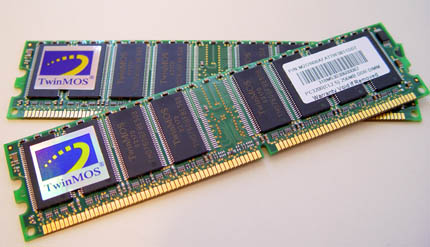
Most motherboards we have in our rigs these days only offer single-channel DDR400 support which only delivers half of the bandwidth of what the 800MHz FSB handles.  So if you are going to buy a new mainboards soon then please take it from me, make sure it support's Dual Channel DDR memory as it will boost your performance bigtime. So what is important to remember when you want Dual Channel DDR in your rig ? A few things .. you must buy modules with identical memory speeds or the memory will default to single-channel DDR speeds.  When using dual-DDR supported motherboards, the user should purchase two sticks of matching RAM rather than one stick of a larger size.

Intel for example released the new 800MHz FSB processor family which we will use to test these modules with, but not many mainboards out on the market can support its really high bandwidth bandwidth.  The processor's (Pentium4 C generation) with 800MHz FSB offers a theoretical total of 6.4 GB/s of memory bandwidth. 

Many of the latest motherboards out there on the market are now featuring dual-channel DDR400 support.  Intel Springdale and Canterwood mainboard are the first of the chipsets to support dual-channel DDR400 for the Intel platform, others like SiS and VIA have chipsets either development or already support both DDR400 and pretty soon the 800MHz FSB bus.

This is a good one to remember .. two sticks of 256MB rated DDR400 will outperform one stick of 512MB DDR400).  In short, these are the requirements for using dual-channel DDR:

  1. Both sticks of memory must be the same size.

  2. Both sticks of memory must have the same type of memory chips.

  3. Both sticks of memory must have the same speed/latency.

  4. Single-sided and double-sided memory sticks can not be mixed.

Basically determine what amount of memory you want in your rig, 512 or 1 GB and buy 2x256 or 2x512 identical memory sticks from the same manufacturer. Several manufacturers also offer you guaranteed the same memory stick and sell it as Dual Channel DDR memory packages exactly as what we review from TwinMOS today.


4 pages 1 2 3 4


Guru3D.com » Articles » TwinMOS DDR400 PC3200 Dual Channel » Page 2

Related Articles
TwinMOS DDR400 PC3200 Dual Channel
Today we are going to review memory modules from TwinMOS, a dual channel kit with in it 2x256MB DDR PC3200 memory. The modules are based on the DDR400 specification is getting very popular.

Follow Guru3D on Google+ - Facebook - YouTube - Twitter © 2013