
Guru3D.com
  • HOME
  • NEWS
    • Channels
    • Archive
    • Search
    • Submit
  • DOWNLOADS
    • New Downloads
    • Categories
    • Archive
    • Search
    • Submit
  • GAME REVIEWS
  • ARTICLES
    • Editorials
    • Guru3D VGA Charts
    • Rig of the Month
    • Join ROTM
    • PC Buyers Guide
    • Dated content
    • More Categories
  • HARDWARE REVIEWS
    • Videocards
    • Processors
    • Audio
    • Motherboards
    • Memory and Flash
    • SSD Storage
    • Chassis
    • Power Supply
    • Laptop and Mobile
    • Smartphone
    • Networking
    • Keyboard Mouse
    • Cooling
    • Knowledgebase
    • Search articles
    • More Categories
  • FORUMS
  • SEARCH
    • Search Articles
    • Search News
    • Search Files
  • NEWSLETTER
  • CONTACT

New Reviews
Gigabyte GeForce GTX 780 WindForce 3x OC review
GeForce GTX 780 SLI and Multi monitor review
GeForce GTX 780 review
OCZ Vertex 450 SSD review
Gigabyte GeForce GTX 650 Ti Boost OC WindForce 2X review
MSI Radeon HD 7790 TurboDuo OC review
Metro Last Light VGA Graphics Benchmark performance test
Noctua NH-U12S and NH-U14S review
ASUS GeForce GTX 670 DirectCU Mini review
OCZ Vertex 3.20 SSD review

New Downloads
GeForce 320.18 WHQL Driver Download
AMD Catalyst Application Profile Download 13.5 CAP1
MSI Afterburner 3.0.0 Beta 10 Download
PhysX System Software 9.13.0325 Download
GPU-Z Download 0.7.1
HWiNFO32 4.18 Download
HWiNFO64 4.18 Download
GeForce 320.14 BETA Driver Download
Nvidia Lifelike Human Face Rendering Tech Demo Download
3DMark Download v1.1.0


New Forum Topics
by: stasio Nvidia GeForce 320.18 WHQL Download and Discussionby: bishi Geforce GTX 780 Owners Clubby: Hilbert Hagedoorn GeForce GTX 780 SLI and Multi monitor reviewby: Sukovsky Titan owners, you have been had! GTX 780by: ESC GTX 780 Already Announced in China Official Specsby: d.B. 7xxx series artifacts/flickering pollby: Hilbert Hagedoorn GeForce GTX 780 reviewby: Stone Gargoyle Xbox World reveals Next Gen Xbox?by: Pill Monster Ford Australia to shut down factoriesby: Keitosha Crucial M4 firmware 070H (02/04/2013)


Online Users
There are currently 4528 user(s) online:
brutlern, cowie, Dranzerk, Elder III, ethne, Ghosty, Google, Grabber, Het, IchimA, kam03, King4x4, KodY, leopr, Live Search, Major Melchett, makaveli316, medo3000, Memorian, miguel, moab600, MSN, Olvik, PhazeDelta1, Romo, stormy, Stryfex, Sukovsky, sverek, Szary, thor2002ro, Yahoo, zipper, zpaf


Guru3D.com » Review » Thunderbolt tested with 2x SSD in RAID0 » Page 1

Thunderbolt tested with 2x SSD in RAID0

Posted by Hilbert Hagedoorn on: 06/14/2012 01:00 PM [ 0 comment(s) ]

Introduction
Tweet


ThunderBolt SSD performance
Thunderbolt tested with 2x SSD in RAID0

In a world where storage devices are getting faster and faster more bandwidth capacity is needed. Within that mindset Intel developed a new connection, initial released as light peak optical technology they dimmed the new technology down a little bit with a "copper" solution for the time being. Yes ThunderBolt has been born and recently several motherboard manufacturers SMT injected that controller chip onto their motherboards.

It's expensive though as the price premium for these motherboards vary roughly 50 to 75 EUR on top of the normal pricing for the very same motherboard.

To bol't'ly go where no one has gone before Thunderbolt (formerly know as Light Peak ) is the fast version of a data communication connector like the 5 Gbps USB 3.0, ThunderBolt however can be twice as fast as it is running at 10 Gbps.
ThunderBolt SSD performance

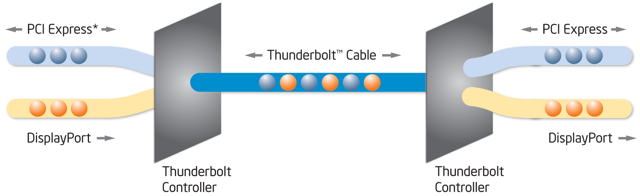
Thunderbolt is based on the very Mini DisplayPort connector developed by Apple and delivers two communications methods, or protocols, on a single cable: PCI Express for data transfer and DisplayPort for displays. Thunderbolt is interoperable with DisplayPort 1.2 compatible devices. So remember that, the Thunderbolt connector functions both as display port and Thunderbolt connector

Thunderbolt technology delivers transfers data in each direction, at the same time (full duplex) - using a single cable to connect devices. That way it's no longer needed to connect multiple devices directly to your PC using multiple cables. By using multiple connection in a daisy chain, the amount of cables directly attached to your PC will be reduced while maintaining maximum throughput. However at this time recommended is to not pass 3 meters. Once the optical connectors will become available, that will be tens of meters.

You can share up-to 7 devices on one connection (sharing that bi-directional 10 Gbps of course), so your motherboard ThunderBolt connector could lead to your monitor, the monitor leads towards a storage unit and your storage unit could lead towards a Thunderbolt audio card.

10 Gbps is 10 Gigabit per second which is 1.25 GB per second or 1280 MB per second. To compare a little, that would be 20 times faster than the theoretical limit of USB 2.0, 12 times faster than FireWire 800, and twice as fast as USB3 which is 5 Gbps. Intel  however claims that 10Gbps isn't just a theoretical peak speed, but is usable bandwidth. This allows a single port to communicate with multiple devices simultaneously for a combined throughput of 10Gbps.
ThunderBolt SSD performance


8 pages 1 2 3 4 next »


Guru3D.com » Articles » Thunderbolt tested with 2x SSD in RAID0 » Page 1

Related Articles
Thunderbolt tested with 2x SSD in RAID0
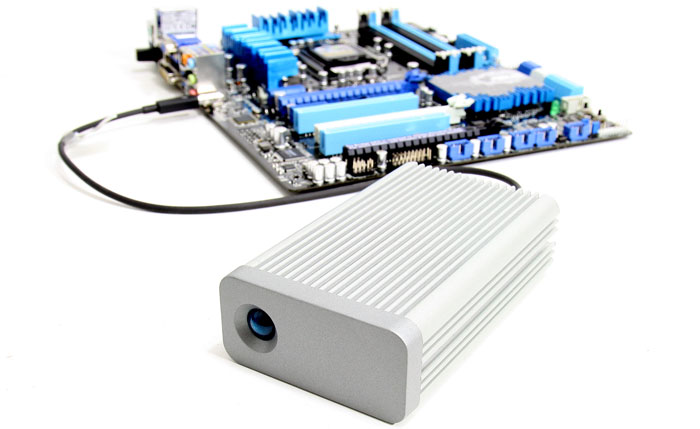
We test the new Thunderbolt connector with 2x SSDs in RAID0 with the help of the ASUS p8z77 vPro Thunderbolt motherboard and the LaCie Little Big Disk which has two Intel 320 SSDs. We RAID-0 them to stripe and check out if the 10 Gbps Thunderbolt connection can keep up.

Follow Guru3D on Google+ - Facebook - YouTube - Twitter © 2013