Guru3D.com
  • HOME
  • NEWS
    • Channels
    • Archive
    • Search
    • Submit
  • DOWNLOADS
    • New Downloads
    • Categories
    • Archive
    • Search
    • Submit
  • GAME REVIEWS
  • ARTICLES
    • Editorials
    • Guru3D VGA Charts
    • Rig of the Month
    • Join ROTM
    • PC Buyers Guide
    • Dated content
    • More Categories
  • HARDWARE REVIEWS
    • Videocards
    • Processors
    • Audio
    • Motherboards
    • Memory and Flash
    • SSD Storage
    • Chassis
    • Power Supply
    • Laptop and Mobile
    • Smartphone
    • Networking
    • Keyboard Mouse
    • Cooling
    • Knowledgebase
    • Search articles
    • More Categories
  • FORUMS
  • SEARCH
    • Search Articles
    • Search News
    • Search Files
  • NEWSLETTER
  • CONTACT

New Reviews
ASUS Maximus VI Extreme Z87 motherboard review
ASUS GeForce GTX 780 DirectCU II OC review
Fractal Design Arc Midi R2 review
Corsair Vengeance K70 review
MSI GeForce GTX 770 Lightning review
EVGA GeForce GTX 770 SC review
Plextor M5M 256GB mSATA SSD review
AMD A10 6800K review
SanDisk Extreme II 120 - 240 and 480 GB SSD review
ASUS Sabertooth Z87 motherboard review

New Downloads
Media Player Classic Home Cinema v1.6.8 Download
Sandra 2013 SP4 19.50 download
MSI Afterburner 3.0.0 Beta 10 Download
AMD Catalyst 13.6 BETA 2 Download
CPU-Z 1.6.4
AIDA64 Download version 3.00
AMD Catalyst 13.6 BETA Download
PrecisionX Download Version 4.2.0
GeForce 320.18 WHQL Driver Download
AMD Catalyst Application Profile Download 13.5 CAP1


New Forum Topics
by: cjs007 The Last of Usby: J.B.west Help me choose music for my gfs restaurantby: harkinsteven Xbox One at E3 all PC's?by: blesner Give Away Threadby: Lemonking Will the 770 work properly in my setup?by: John Guru3D Music Discussion Threadby: Stone Gargoyle Xbox World reveals Next Gen Xbox?by: Pill Monster Win ToolKit - anyone used i? It's an amazing tool to used to image your OS before insby: Taint3dBulge AMD FX 9590 to cost $960by: rizqicandra amd catalyst stopped working (need help urgently)


Online Users
There are currently 2045 user(s) online:
Google, MSN, tomsanity, volkov956, xIcarus, Yahoo


Guru3D.com » Review » Palit GeForce GTX 680 JetStream review » Page 25

Palit GeForce GTX 680 JetStream review - Overclocking the graphics card

Posted by Hilbert Hagedoorn on: 04/12/2012 01:00 PM [ 0 comment(s) ]

Tweet


Overclocking the graphics card

As most of you know, with most video cards you can apply a simple series of tricks to boost the overall performance a little. You can do this at two levels, namely tweaking by enabling registry or BIOS hacks, or very simply to tamper with Image Quality. And then there is overclocking, which will give you the best possible results by far.

What do we need?
One of the best tools for overclocking NVIDIA and ATI videocards is our own AfterBurner which will work with 90% of the graphics cards out there. We can really recommend it, download here.

Where should we go?
Overclocking: By increasing the frequency of the videocard's memory and GPU, we can make the videocard increase its calculation clock cycles per second. It sounds hard, but it really can be done in less than a few minutes. I always tend to recommend to novice users and beginners, to not increase the frequency any higher than 5% on the core and memory clock. Example: If your card runs at 600 MHz (which is pretty common these days) then I suggest that you don't increase the frequency any higher than 30 to 50 MHz.

More advanced users push the frequency often way higher. Usually when your 3D graphics start to show artifacts such as white dots ("snow"), you should back down 10-15 MHz and leave it at that. Usually when you are overclocking too hard, it'll start to show artifacts, empty polygons or it will even freeze. Carefully find that limit and then back down at least 20 MHz from the moment you notice an artifact. Look carefully and observe well. I really wouldn't know why you need to overclock today's tested card anyway, but we'll still show it.

All in all... do it at your own risk.

Original This sample Overclocked
Core Clock: 1006 MHz Core Core Clock: 1084 MHz Core Clock: 1184 MHz
Boost Clock: 1058 MHz Boost Clock: 1150 MHz Boost Clock: ~1250 MHz
Memory Clock: 6000 MHz Memory Clock: 6300 MHz Memory Clock: 7200 MHz

Now with the Dynamic boost function of the series 600 cards overclocking is definitely going to be more complicated. It remains simple though. Mind you that for overclocking we used Beta 15 of AfterBurner for ease of use.

In Afterburner or the overclock tool of your preference we go into the preferences. We can widen up the TDP limitations a bit, set the power limiter towards it's maximum. That way the Dynamic boost function won't down clock all the time to meet it's upper threshold in TDP limitations.

We have core voltage upped another 100Mv, but the NVIDIA driver currently does not seem to kick in the additional voltage.

The Core clock was increased with another 100 MHz we tried higher yet got some instability and our overclocks and tweaks are always based 100% game stability.

The memory on this board is flying frickin fast! We got it running stable at 3600 MHz, which is a 7200 MHz effective gDDR5 datarate.

So for the core we ended at roughly 1250 MHz with the dynamic clock kicking in, absolutely stable and for the memory we ended at 7200 MHz (effective data rate). At this stage we locked the cooler RPM at 65% RPM, that's on the high side and now audible but it keeps the GPU under 55 Degres C (!). With that extra performance at our hands, have a peek at the results when overclocked.
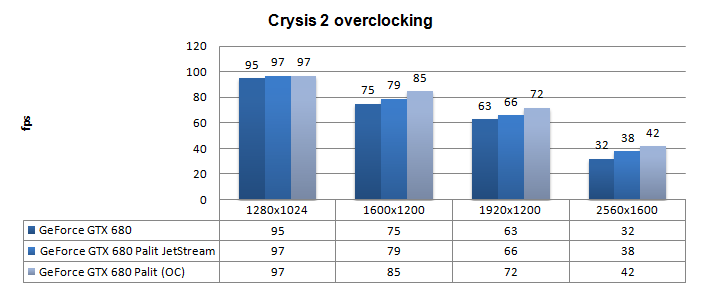
Palit GeForce GTX 680 JetStream

Above, Crysis 2, same maxed out image quality settings as before yet now with added overclock results:

  • DirectX 11
  • High Resolution Texture Pack
  • Ultra Quality settings
  • 4x AA
  • Level - Times Square (2 minute custom time demo)
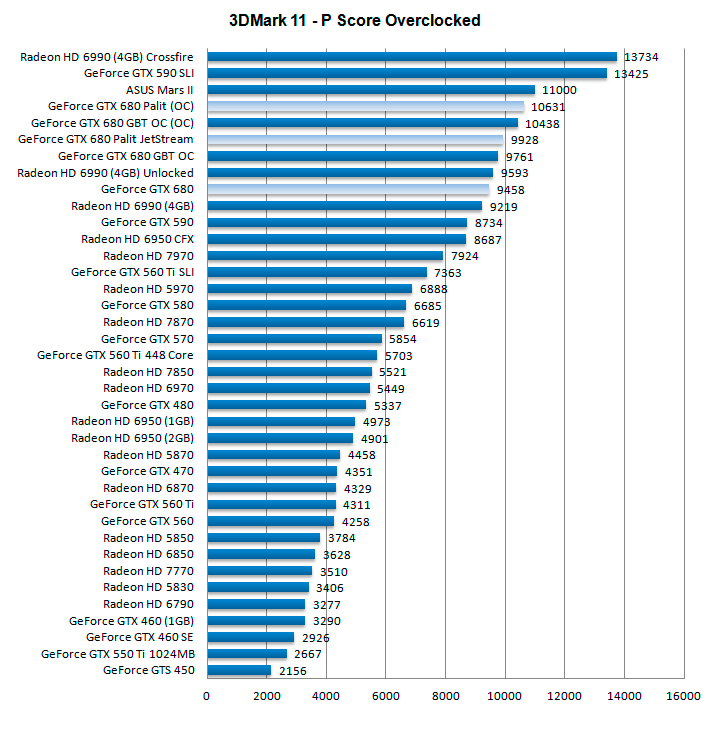
Palit GeForce GTX 680 JetStream

Above, 3DMark 11 - the Performance test and score. As you can see, there is an additional bump in this very GPU intensive software, lovely.
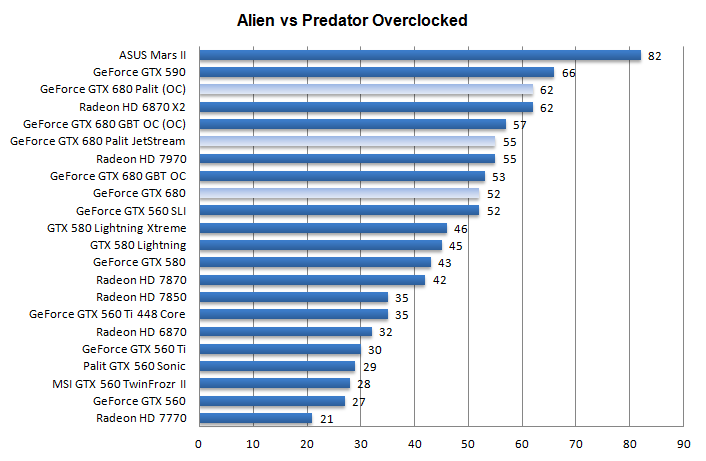
Palit GeForce GTX 680 JetStream

Above, Alien versus Predator, in 1920x1200 at 4xAA and 16X anisotropic filtering


26 pages « < 23 24 25 26


Related Articles
Win a Palit GeForce GTX 770 JetStream graphics card
Guru3D and Palit once again partner up to get you some cool hardware. Palit this week released the GeForce GTX 770 JetStream edition graphics card which offers high-end performance whilst being totally silent. To participate, all you need to do is Like our Facebook page and comment in a thread as to why you need this card so much. Good Luck!

Palit GeForce GTX 770 Jetstream review
In this review and benchmark the Palit GeForce GTX 770 Jetstream. This graphics card comes with massive factory overclock and the new 3-slot -3 fan cooler. That would be three silent 80mm fans. Overall the card is sitting in-between the GeForce GTX 680 and GeForce GTX 780 , very chill and 100% silent. We test the product with the hottest games like Metro: Last light, Battlefield 3, Sleeping Dogs, Far Cry 3, Medal of Honor Warfighter, Hitman Absolution and many more.

Palit GeForce GTX 650 Ti Boost OC edition review
For this review we test and benchmark the Palit GeForce GTX 650 Ti Boost OC edition. The product comes customized with their own PCB design, a dual-fan cooler, 2GB of memory with both that memory and the core baseclock slightly overclocked.

Palit GeForce GTX 660 Ti Jetstream review
In this review we'll look at the GeForce GTX 660 Ti from Palit, it's their all beefed up version, the GeForce GTX 660 Ti JetStream version. The GTX 660 Ti again has been equipped with a JetStream series cooler yet which remains a 3-slot design. It runs at a core clock frequency of 1006 MHz, has a boost frequency of 1085 MHz and the effective memory data rate (192-bit) is 6108 MHz.

Follow Guru3D on Google+ - Facebook - YouTube - Twitter © 2013