
Guru3D.com
  • HOME
  • NEWS
    • Channels
    • Archive
    • Search
    • Submit
  • DOWNLOADS
    • New Downloads
    • Categories
    • Archive
    • Search
    • Submit
  • GAME REVIEWS
  • ARTICLES
    • Editorials
    • Guru3D VGA Charts
    • Rig of the Month
    • Join ROTM
    • PC Buyers Guide
    • Dated content
    • More Categories
  • HARDWARE REVIEWS
    • Videocards
    • Processors
    • Audio
    • Motherboards
    • Memory and Flash
    • SSD Storage
    • Chassis
    • Power Supply
    • Laptop and Mobile
    • Smartphone
    • Networking
    • Keyboard Mouse
    • Cooling
    • Knowledgebase
    • Search articles
    • More Categories
  • FORUMS
  • SEARCH
    • Search Articles
    • Search News
    • Search Files
  • NEWSLETTER
  • CONTACT

New Reviews
MSI Radeon HD 7790 TurboDuo OC review
Metro Last Light VGA Graphics Benchmark performance test
Noctua NH-U12S and NH-U14S review
ASUS GeForce GTX 670 DirectCU Mini review
OCZ Vertex 3.20 SSD review
Cooler Master Eisberg 240L Prestige review
Guru3D and OCZ Contest - PC Power 1200W PSU Giveaway
MSI GeForce GTX 650 Ti BOOST OC review
ASUS ROG ORION PRO Gaming Headset Review
Guru3D Rig of the Month - April 2013

New Downloads
GPU-Z Download 0.7.1
HWiNFO32 4.18 Download
HWiNFO64 4.18 Download
GeForce 320.14 BETA Driver Download
Nvidia Lifelike Human Face Rendering Tech Demo Download
3DMark Download v1.1.0
XBMC Media Center Download 12.0 2
RTSS Rivatuner Statistics Server Download v5.1.1
AS SSD Benchmark Download v1.7.4739.38088
AMD Catalyst Application Profile Download 13.4 CAP1


New Forum Topics
by: Agent-A01 Geforce GTX TITAN Owner Clubby: Sir Galahad Time for an upgradeby: eclap PC won't postby: John Your song of the day Vol. 11by: ricardonuno1980 CRT monitor more shaking after new UPSby: Shabaco are some games optimized for certain gfx cards?by: Hilbert Hagedoorn RadeonPro BETA (Automating 3D Settings) #2by: villa_youth Metro: Last Lightby: deltatux Looking for a new pair of 2.1 speakersby: Noisiv Nvidia GeForce 320.14 BETA - Download and Discussion


Online Users
There are currently 2366 user(s) online:
ESlik, FatBoyNL, Google, iCroW, Live Search, macioh, MSN, Radikalman, spajdrik, warlord, Yahoo, yasamoka, zer0_c0ol


Guru3D.com » Review » Overclocking the Radeon HD 4770 (Guide) » Page 1

Overclocking the Radeon HD 4770 (Guide)

Posted by Hilbert Hagedoorn on: 04/30/2009 01:00 PM [ 0 comment(s) ]

Introduction
Tweet


Radeon HD 4770 Overclock Guide

This week the Radeon HD 4770 was released by ATI and as our reference article showed, it has a lot of overclocking potential.

Being a budget card with a lot of punch, overall performance is to be found in the mid-range segment. We here at Guru3D.com would like to teach you how to get more out of your 99 USD investment. In fact we'll show you how to get another 10 to 20% additional performance out of the card, totally free.

I mean seriously, the Radeon HD 4770  has a lot of tweaking headroom.

Typically overclocking can be managed really well through the Catalyst control center, however .. the control center always has certain restriction as in 'how much' you can actually overclock. In this article we'll show you how you can overclock the easy way, with the help of this little application we make ourselves, Rivatuner.

This article is really simple as all we'll show you is, how to manage an overclock; and of course throw in a couple of additional benchmarks.

So what exactly is  Overclocking & Tweaking ? -- Well, as most of you with most videocards know, you can apply a simple series of tricks to boost the overall performance a little. You can do this at two levels, namely tweaking by enabling registry or BIOS hacks, or very simple, tamper with Image Quality, which you never want to do really. Then there is overclocking, which will give you the best possible results by far, on the fly, for free. it only takes a little time an patience.

Literally by increasing the frequency of the videocard's memory and graphics processor, we can make the videocard increase its calculation clock cycles per second, making it run faster. It sounds hard, but it really can be done in less than a few minutes. A word of advise though, I always tend to recommend to novice users and beginners not to increase the frequency any higher then 5% (in total) of the core and memory clock MHz.

What do we need? One of the best tool for overclocking NVIDIA and ATI videocards is our own Rivatuner that you can download from our website. If you own an ATI or NVIDIA graphics card then the manufacturer actually has very nice built in options for you that can be found in the display driver properties.

Next page please, where we'll learn you to overclock your graphics card, done right..
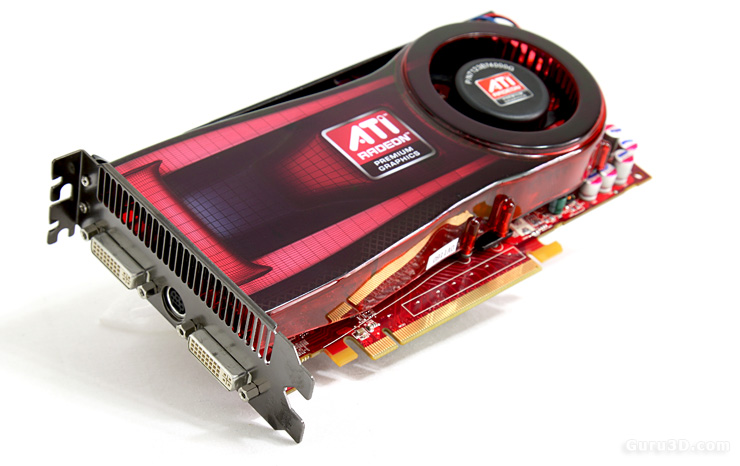
 

ATI Radeon HD 4770 review


8 pages 1 2 3 4 next »


Guru3D.com » Articles » Overclocking the Radeon HD 4770 (Guide) » Page 1

Related Articles
GeForce GTX Titan Overclock Guide
Today an article slash guide dedicated on overclocking the GeForce GTX Titan. Can we take it to 1100 MHz ? Sure we can. Armed with a new trick or two overclocking will never be the same though.

GeForce GTX 680 Overclock Guide
Today an article dedicated on overclocking the GeForce GTX 680. Can we take it to 1300 MHz ? Yes we can.

Radeon HD 7870 Overclock Guide
This is a Radeon HD 7870 Overclock Guide. We'll overclock based on a mild voltage tweak. By doing so we drive the R7870 into R7900 series performance. All you need is some free software and a little time to precisely determine and pinpoint your maximum yet stable overclock.

Radeon HD 7950 Overclock Guide
We take a Radeon HD 7950 overclock it the normal way and then voltage tweaked. So that way we will demonstrate not one, but two maximum overclock conditions alongside TDP, heat, noise and performance levels.

Follow Guru3D on Google+ - Facebook - YouTube - Twitter © 2013