Guru3D.com
  • HOME
  • NEWS
    • Channels
    • Archive
    • Search
    • Submit
  • DOWNLOADS
    • New Downloads
    • Categories
    • Archive
    • Search
    • Submit
  • GAME REVIEWS
  • ARTICLES
    • Editorials
    • Guru3D VGA Charts
    • Rig of the Month
    • Join ROTM
    • PC Buyers Guide
    • Dated content
    • More Categories
  • HARDWARE REVIEWS
    • Videocards
    • Processors
    • Audio
    • Motherboards
    • Memory and Flash
    • SSD Storage
    • Chassis
    • Power Supply
    • Laptop and Mobile
    • Smartphone
    • Networking
    • Keyboard Mouse
    • Cooling
    • Knowledgebase
    • Search articles
    • More Categories
  • FORUMS
  • SEARCH
    • Search Articles
    • Search News
    • Search Files
  • NEWSLETTER
  • CONTACT

New Reviews
MSI Radeon HD 7790 TurboDuo OC review
Metro Last Light VGA Graphics Benchmark performance test
Noctua NH-U12S and NH-U14S review
ASUS GeForce GTX 670 DirectCU Mini review
OCZ Vertex 3.20 SSD review
Cooler Master Eisberg 240L Prestige review
Guru3D and OCZ Contest - PC Power 1200W PSU Giveaway
MSI GeForce GTX 650 Ti BOOST OC review
ASUS ROG ORION PRO Gaming Headset Review
Guru3D Rig of the Month - April 2013

New Downloads
GPU-Z Download 0.7.1
HWiNFO32 4.18 Download
HWiNFO64 4.18 Download
GeForce 320.14 BETA Driver Download
Nvidia Lifelike Human Face Rendering Tech Demo Download
3DMark Download v1.1.0
XBMC Media Center Download 12.0 2
RTSS Rivatuner Statistics Server Download v5.1.1
AS SSD Benchmark Download v1.7.4739.38088
AMD Catalyst Application Profile Download 13.4 CAP1


New Forum Topics
by: signex Subwoofer died after only 3 months of use.by: Pentup Sabertooth Gen3/R.2by: FULMTL Have you ever pledged toward a Kickstarter project?by: Hilbert Hagedoorn NVIDIA GeForce GTX 780, GTX 770 and GTX 760 Tiby: FlawleZ Crate Entertainment's - Grim Dawnby: ignasx12 Gtx680 topby: villa_youth Metro: Last Lightby: Pigchild Can't get past 4.4Ghz. Please review need advice.by: dellon132 ATI Catalyst 12.11 Beta 11 Modded driver For Legacy GPUby: BLEH! Hostile Superioirty-Complex Co-Workers - What to do?


Online Users
There are currently 2767 user(s) online:
BeeJAyP, FatBoyNL, Google, Grabber, Live Search, MSN, neeal, Noisiv, spajdrik, Yahoo


Guru3D.com » Review » MSI GeForce GTX 580 Lightning review » Page 4

MSI GeForce GTX 580 Lightning review

Posted by Hilbert Hagedoorn on: 04/14/2011 01:00 PM [ 0 comment(s) ]

Product Showcase
Tweet 


MSI GeForce GTX 580 Lightning

The GeForce GTX 580 comes with 1536 MB memory. The reference card is clocked at a 772 MHz core frequency, 1544 MHz on the shader processors and the GDDR5 memory runs at 4000 MHz (effective).

This MSI card runs at 832 MHz on the core, 1664 on the shaders and 4200 MHz on the memory. That should bring in a little extra performance.

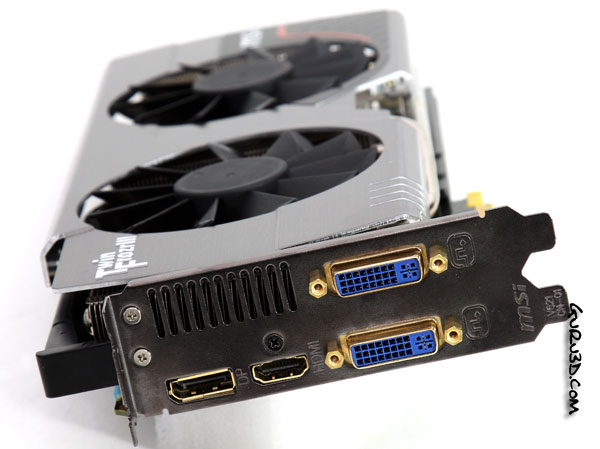
Connectivity wise, we see two dual-link DVI connectors supporting all high-resolution monitors and all the way to the left you can see a HDMI and DisplayPort connector.
MSI GeForce GTX 580 Lightning

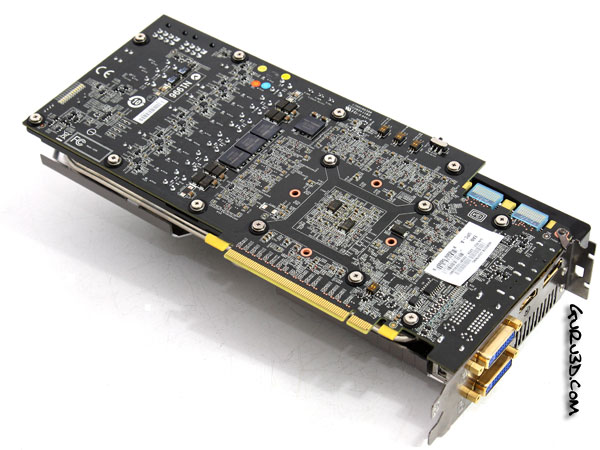
Here we can see the backside, the card measures roughly 27cm in length. Overall, a clean dark looking PCB, lots of smaller components though. We'll discuss some of them in a later stage.

The GeForce GTX 580 has a maximum power consumption of just under 250 Watts, as such you'll need to power the card with two 8-pin PCIe PEG connectors from your power supply. We recommend a 600W power supply to start with, and that is with one card of course.
MSI GeForce GTX 580 Lightning

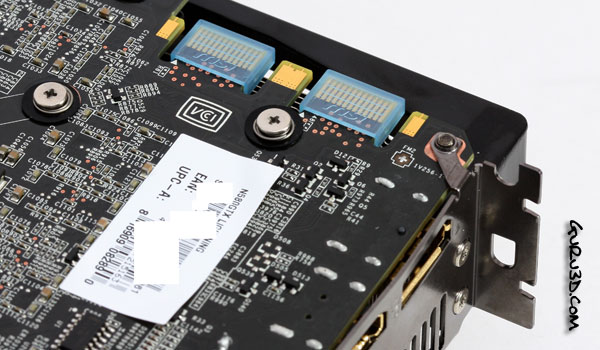
Like any high-end GeForce graphics card, NVIDIA will allow you to opt for the multi-GPU road with SLI as an option. You can pair two or three cards in one PC and have them do a decent workout.
MSI GeForce GTX 580 Lightning

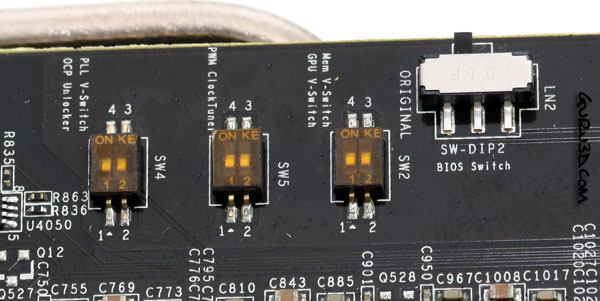
At the backside you'll also spot a number of switches.  These are for the die-hard overclocked cooling with LN2 etc. OCP Unlock Switch removes over current protection, unlocked GPU and MEM voltage switches. it's wise to leave these switches as is, unless you plan to sub-zero cool the GPU and other essential components.

The bigger switch to your right is a BIOS switch, and allows you to drop back to the default bios should you by accident have messed up the initial bios with an OC firmware profile,  of course you can also use the 2nd BIOS and optimize and flash that with a tweaked profile.


21 pages « 3 4 5 6 next »


Guru3D.com » Articles » MSI GeForce GTX 580 Lightning review » Page 4

Related Articles
MSI GeForce GTX 650 Ti BOOST OC review
In this article we review the MSI GeForce GTX 650 Ti BOOST OC edition review with that OC for a factory tweak. The product is customized with a new PCB, cooling and a few tweaks, it has 2GB of memory with both that memory and the core base-clock slightly overclocked. Overall an interesting product at an interesting price in the lower segment of the mainstream market.

MSI GeForce GTX 660 HAWK review
MSI GeForce GTX 660 HAWK we test and review the graphics card also located under SKU N660 HAWK.

MSI GeForce GTX 650 Ti review
We review the MSI GeForce GTX 650 Ti Power Edition. MSI applies a custom PCB and their Cyclone II cooler. Next to that you receive a factory overclock right out of the box. Let's check it out shall we ?

MSI GeForce GTX 660 TwinFrozr III review
We review the MSI GeForce GTX 660 TwinFrozr III. it's already factory overclocked for you, comes in a custom design PCB out and is custom cooled. Combined with MSI's Military component usage you may expect something sturdy and well performing. lets check out this review.

Follow Guru3D on Google+ - Facebook - YouTube - Twitter © 2013