
Guru3D.com
  • HOME
  • NEWS
    • Channels
    • Archive
    • Search
    • Submit
  • DOWNLOADS
    • New Downloads
    • Categories
    • Archive
    • Search
    • Submit
  • GAME REVIEWS
  • ARTICLES
    • Editorials
    • Guru3D VGA Charts
    • Rig of the Month
    • Join ROTM
    • PC Buyers Guide
    • Dated content
    • More Categories
  • HARDWARE REVIEWS
    • Videocards
    • Processors
    • Audio
    • Motherboards
    • Memory and Flash
    • SSD Storage
    • Chassis
    • Power Supply
    • Laptop and Mobile
    • Smartphone
    • Networking
    • Keyboard Mouse
    • Cooling
    • Knowledgebase
    • Search articles
    • More Categories
  • FORUMS
  • SEARCH
    • Search Articles
    • Search News
    • Search Files
  • NEWSLETTER
  • CONTACT

New Reviews
MSI Radeon HD 7790 TurboDuo OC review
Metro Last Light VGA Graphics Benchmark performance test
Noctua NH-U12S and NH-U14S review
ASUS GeForce GTX 670 DirectCU Mini review
OCZ Vertex 3.20 SSD review
Cooler Master Eisberg 240L Prestige review
Guru3D and OCZ Contest - PC Power 1200W PSU Giveaway
MSI GeForce GTX 650 Ti BOOST OC review
ASUS ROG ORION PRO Gaming Headset Review
Guru3D Rig of the Month - April 2013

New Downloads
GPU-Z Download 0.7.1
HWiNFO32 4.18 Download
HWiNFO64 4.18 Download
GeForce 320.14 BETA Driver Download
Nvidia Lifelike Human Face Rendering Tech Demo Download
3DMark Download v1.1.0
XBMC Media Center Download 12.0 2
RTSS Rivatuner Statistics Server Download v5.1.1
AS SSD Benchmark Download v1.7.4739.38088
AMD Catalyst Application Profile Download 13.4 CAP1


New Forum Topics
by: evilkiller650 Overheating CPU affect game performance?by: Syidi question on socket and CPU compatibility?by: klambre Aliens Colonial Marines [PAX]by: villa_youth Metro: Last Lightby: HonoredShadow Does the 'Use Nvidia settings' mean what I think it means?by: Hilbert Hagedoorn 10 percent of notebooks have a touchscreenby: Ralph Kerbal Space Programby: The Laughing Ma Any theories on what happened here?by: ricardonuno1980 CRT monitor more shaking after new UPSby: morbias Eurovision 2013


Online Users
There are currently 2471 user(s) online:
Anarion, Faruk, Google, iako, Live Search, moab600, MSN, Noufel, shadyG, ultraex2003, Yahoo


Guru3D.com » Review » HIS Radeon HD 4850 ICEQ4 TurboX review » Page 1

HIS Radeon HD 4850 ICEQ4 TurboX review

Posted by Hilbert Hagedoorn on: 10/05/2008 01:00 PM [ 0 comment(s) ]

1 - Introduction
Tweet

HIS Radeon HD 4850 ICEQ4 TurboX

Product: Radeon HD 4850 ICEQ4 TurboX
Manufacturer: HIS technology
SKU code: H485QX512P
Information: HIS website
Street price: $199

HIS Radeon HD 4850 ICEQ4 TurboXIt is rare in the history of the graphics card industry, that a manufacturer introduces that all new pro-active gaming device, and then procedes to have so much success. The strategy behind the Radeon 4800 series is simple, high performance, at a fair price. I mean face it, you drop 175-199 USD and bam... you receive a card allowing you to play the very latest games at a good screen resolution and great image quality.

For the manufacturers, a little bit of a downside is to be able to do such a thing at a very affordable price, you need to cut away stuff and save money to offer the product as cheap as possible. On the Radeon HD 4850 the problem is very clear, it can get really hot, and it could be a bit more silent yet the biggest downside, thanks to it's cooling, is that the residual heat is dumped inside the PC.

Luckily for us there are always a couple of manufacturers out there who are willing to do things slightly different. HIS technology always has been such a company. Surely they'll sell the regular versions just as well, yet typically a month after the original reference products are unleashed onto the market, HIS comes up with a slightly customized design. The regulars around guru3d and those intrested in the industry all know about the ICEQ concept, that dual-slot cooler based series of graphics cards from which we tested so much in the past already.

It was therefore no surprise to see HIS launch the Radeon HD 4850 512MB with a customized cooler, the new ICEQ4 model. Again very silent, again very good cooling performance and again, great looks. Next to that HIS decided to overclock the card a bit for you as well. Suffice to say, how can it not be a winner ? [Ed - I dont know, why else would there be 15 pages in this review!]

In this review we'll show you all the ins and outs of this product, as usual. Next page please, but not before you had a look at what we are testing today.
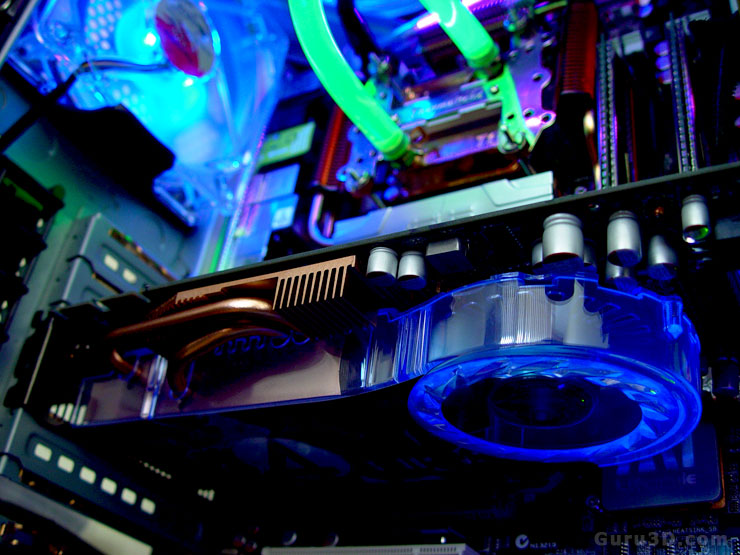
HIS Radeon HD 4850 ICEQ4 TurboX


15 pages 1 2 3 4 next »


Guru3D.com » Articles » HIS Radeon HD 4850 ICEQ4 TurboX review » Page 1

Related Articles
HIS Radeon HD 7950 HIS IceQ X2 review
We test and review the a HIS Radeon HD 7950 HIS IceQ X, this 30 CM sized beast is one heck of a graphics card. Custom PCB, custom cooling, it's low noise and being a Boost edition card series, it clocks in at 950 MHz.

HIS Radeon HD 7850 4GB iPower IceQ Turbo review
We test and review the a HIS Radeon HD 7850 iPower IceQ Turbo as single card and in Crossfire today. The HIS Radeon HD 7850 iPower IceQ Turbo is a factory overclocked 4GB version of the Radeon HD 7850 graphics card.

HIS Radeon HD 7970 X Turbo edition review
We review the HIS Radeon HD 7970 X Turbo edition. With this card they took the new Tahiti XT2 and redesigned the R7970 board from ground up. though very long the end result is a 31cm PCB with mane power phases and optimizations. Fun to see are the voltage and FAN monitor LED options. Most impressive however is the sheer amount of monitor connectors HIS injected into this product, four DisplayPort connectors, one HDMI and a DVI connector. If needed you can go for Eyefinity6. Oh did I mention already that the factory set boost clock frequency is 1180 Mhz ?

HIS Radeon HD 7950 ICEQ Turbo review
We review the HIS Radeon HD 7950 IceQX Turbo. The product comes factory overclocked very nicely for you as it is running a gentle 900 MHz clock frequency. HIS uses a custom PCB and dual-slot cooler making the card very easy to install. Despite that factory overclock and that cooler the noise levels remain at very low levels whereas the GPU temperatures remain downright excellent as we'll show you in this review.

Follow Guru3D on Google+ - Facebook - YouTube - Twitter © 2013