Guru3D.com
  • HOME
  • NEWS
    • Channels
    • Archive
    • Search
    • Submit
  • DOWNLOADS
    • New Downloads
    • Categories
    • Archive
    • Search
    • Submit
  • GAME REVIEWS
  • ARTICLES
    • Editorials
    • Guru3D VGA Charts
    • Rig of the Month
    • Join ROTM
    • PC Buyers Guide
    • Dated content
    • More Categories
  • HARDWARE REVIEWS
    • Videocards
    • Processors
    • Audio
    • Motherboards
    • Memory and Flash
    • SSD Storage
    • Chassis
    • Power Supply
    • Laptop and Mobile
    • Smartphone
    • Networking
    • Keyboard Mouse
    • Cooling
    • Knowledgebase
    • Search articles
    • More Categories
  • FORUMS
  • SEARCH
    • Search Articles
    • Search News
    • Search Files
  • NEWSLETTER
  • CONTACT

New Reviews
ASUS Maximus VI Extreme Z87 motherboard review
ASUS GeForce GTX 780 DirectCU II OC review
Fractal Design Arc Midi R2 review
Corsair Vengeance K70 review
MSI GeForce GTX 770 Lightning review
EVGA GeForce GTX 770 SC review
Plextor M5M 256GB mSATA SSD review
AMD A10 6800K review
SanDisk Extreme II 120 - 240 and 480 GB SSD review
ASUS Sabertooth Z87 motherboard review

New Downloads
Media Player Classic Home Cinema v1.6.8 Download
Sandra 2013 SP4 19.50 download
MSI Afterburner 3.0.0 Beta 10 Download
AMD Catalyst 13.6 BETA 2 Download
CPU-Z 1.6.4
AIDA64 Download version 3.00
AMD Catalyst 13.6 BETA Download
PrecisionX Download Version 4.2.0
GeForce 320.18 WHQL Driver Download
AMD Catalyst Application Profile Download 13.5 CAP1


New Forum Topics
by: Stone Gargoyle Xbox World reveals Next Gen Xbox?by: CPC_RedDawn Half Life 3, Left 4 Dead 3, Source 2 and more found on leaked Valve document!by: blesner Give Away Threadby: kiya Teen threatens to kill his sister if J. Cole didn't retweet himby: aircool Battlefield 3 (Official Thread) Pt. 3by: jack_rudolph Samsung Galaxy S4 Threadby: Hilbert Hagedoorn Microsoft works on Surface RT with Snapdragon 800by: anticupidon Summer projects?by: Hilbert Hagedoorn LG demos 55-inch curved OLED TVby: AmiloMan Legacy Modder out for DirectX 9 and 10 Cards


Online Users
There are currently 3039 user(s) online:
---TK---, Anarion, ceesay, errorrrr, Google, iancook221188, Live Search, MSN, TechnikL, The_Fool, Yahoo, zipper


Guru3D.com » Review » HIS Radeon 6850 & 6870 review » Page 4

HIS Radeon 6850 & 6870 review - Monitor connectivity - Eyefinity

Posted by Hilbert Hagedoorn on: 10/24/2010 01:00 PM [ 0 comment(s) ]

Tweet


Monitor connectivity - Eyefinity

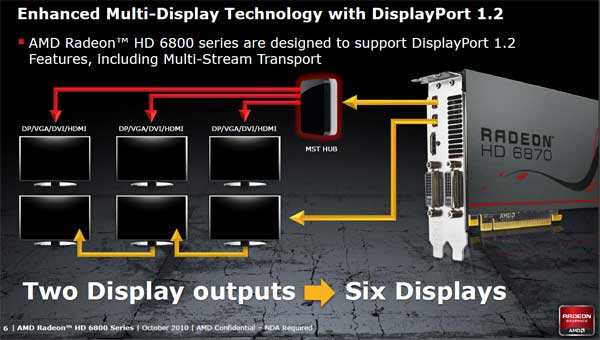
You guys will notice that the new 6800 series cards have a plethora of monitor connectors. Quite a bit has changed. The reference design cards will carry two mini DisplayPort (v1.2) connectors, one HDMI 1.4a connector and two DVI connectors of which one is single link, the other dual-link.

DisplayPort is now up-to snuff at revision v1.2 and that allows for a lot of extra bandwidth, in fact per connector you could drive up-to three monitors, so if you use both DP 1.2 connectors, up-to 6 monitors will be supported. Unfortunately that isn't all, connecting six monitors to two DisplayPort connectors will require an external breakout-box or monitors that support a daisy chain (very expensive). The external breakout-box I mentioned will be called a MST HUB (Multi Stream Transport), to date pricing and availability for that is unknown.

Of course, you can configure Eyefinity as you please, through multiple monitors per DP connector, or one at a time with the help of the DVI connectors.
Radeon HD 6850 and 6870

DP 1.2 can support six monitors per two connectors, but will require a breakout box or daisy chain compatible monitors. So really you are back to three easy to connect monitors. We advise three monitors as a maximum for Eyefinity anyway.


Eyefinity

An exciting feature that started in the Radeon series 5000, and now continued on the 6000 series graphics cards is Eyefinity. You will have no problem connecting say, three 30" monitors at 2560x1600. The graphics card can take that resolution and in fact combine the screen resolution and play in it.

ATI's Series 6000 graphics cards will be able to drive one to six monitors per graphics card depending on the limitations we just mentioned in the previous chapter about monitor connectivity. We've tested this live in action, and Eyefinity works really nicely. You can combine monitors and get your groove on up-to say 7680x3200 pixels separated over several monitors -- multiple monitors to be used as a single display.

So some examples of what you can do here:

  • Single monitor setup at 2560x1600
  • Dual monitor setup at 2560x1600 per monitor
  • Triple monitor setup at 2560x1600 per monitor
  • Six monitors setup at 1920x1080 per monitor

Eyefinity is a really nice feature, and sure, we also understand that 99% of you guys will never use more than two monitors. That other 1% definitely matches the Guru3D audience. Personally I like to game on three screens. It's really immersive. If you are bold enough to go for a multi-monitor setup, it really is ideal to get three screens for flight sims, racing games, role playing games, real-time strategy (huge maps!), first-person shooters and sure, even multimedia apps.

We have two reviews available on Eyefinity:

  • Radeon HD 5870 Eyefinity (three monitors) review - click here.
  • Radeon HD 5870 Eyefinity6 (six monitors) review - click here.

Eyefinity is modular and thus allows users to rearrange the number of discrete images created in addition to their shape according to your liking. Guru3D users and gamers will no doubt find this setup to their liking. It will be interesting to learn just what kind of living room you have if you were to employ such a configuration. Please post your setups in our forums, we'd love to hear from you.

Now, since monitor bezels are a little icky I have created the above video to show you how you could do it as well ;)


21 pages « 3 4 5 6 next »


Related Articles
HIS Radeon HD 7950 HIS IceQ X2 review
We test and review the a HIS Radeon HD 7950 HIS IceQ X, this 30 CM sized beast is one heck of a graphics card. Custom PCB, custom cooling, it's low noise and being a Boost edition card series, it clocks in at 950 MHz.

HIS Radeon HD 7850 4GB iPower IceQ Turbo review
We test and review the a HIS Radeon HD 7850 iPower IceQ Turbo as single card and in Crossfire today. The HIS Radeon HD 7850 iPower IceQ Turbo is a factory overclocked 4GB version of the Radeon HD 7850 graphics card.

HIS Radeon HD 7970 X Turbo edition review
We review the HIS Radeon HD 7970 X Turbo edition. With this card they took the new Tahiti XT2 and redesigned the R7970 board from ground up. though very long the end result is a 31cm PCB with mane power phases and optimizations. Fun to see are the voltage and FAN monitor LED options. Most impressive however is the sheer amount of monitor connectors HIS injected into this product, four DisplayPort connectors, one HDMI and a DVI connector. If needed you can go for Eyefinity6. Oh did I mention already that the factory set boost clock frequency is 1180 Mhz ?

HIS Radeon HD 7950 ICEQ Turbo review
We review the HIS Radeon HD 7950 IceQX Turbo. The product comes factory overclocked very nicely for you as it is running a gentle 900 MHz clock frequency. HIS uses a custom PCB and dual-slot cooler making the card very easy to install. Despite that factory overclock and that cooler the noise levels remain at very low levels whereas the GPU temperatures remain downright excellent as we'll show you in this review.

Follow Guru3D on Google+ - Facebook - YouTube - Twitter © 2013