Overclocking the Radeon HD 7870
Overclocking The Radeon HD 7870
As most of you know, with most videocards you can apply a simple series of tricks to boost the overall performance a little. You can do this at two levels, namely tweaking by enabling registry or BIOS hacks, or very simply to tamper with Image Quality. And then there is overclocking, which will give you the best possible results by far.
What do we need?One of the best tools for overclocking NVIDIA and ATI videocards is our own AfterBurner which will work with 90% of the graphics cards out there. We can really recommend it, download here.
Where should we go?
Overclocking: By increasing the frequency of the videocard's memory and GPU, we can make the videocard increase its calculation clock cycles per second. It sounds hard, but it really can be done in less than a few minutes. I always tend to recommend to novice users and beginners, to not increase the frequency any higher than 5% on the core and memory clock. Example: If your card runs at 600 MHz then I suggest that you don't increase the frequency any higher than 30 to 50 MHz.
More advanced users push the frequency often way higher. Usually when your 3D graphics start to show artifacts such as white dots ("snow"), you should back down 10-15 MHz and leave it at that. Usually when you are overclocking too hard, it'll start to show artifacts, empty polygons or it will even freeze. Carefully find that limit and then back down at least 20 MHz from the moment you notice an artifact. Look carefully and observe well. I really wouldn't know why you need to overclock today's tested card anyway, but we'll still show it.
All in all... do it at your own risk.
The Radeon HD 7870
| Original | This sample | Overclocked |
| Core Clock: 1000 MHz | Core Clock: 1100 MHz | Core Clock: 1258 MHz |
| Shader Clock: 1000 MHz | Shader Clock: 1100 MHz | Shader Clock: 1258 MHz |
| Memory Clock: 4800 MHz | Memory Clock: 4800 MHz | Memory Clock: 5800 MHz |
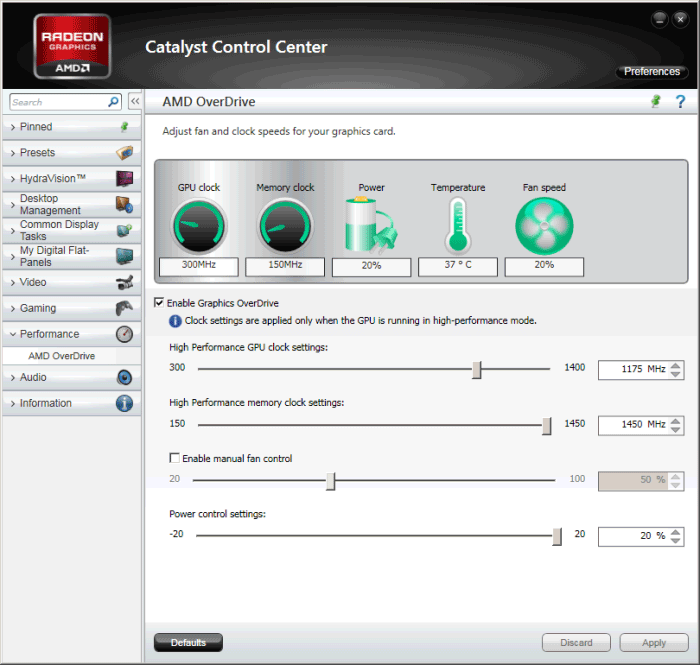
For the R7870 we open up AMD Overdrive or AfterBurner and free the card up from TDP restrictions first, so all the way down move the Power Control settings slider towards 20%.
Overclocking wise the card will allow itself to be clocked to roughly 1150 MHz on the core easily and that's without voltage tweaking. We were actually able to push the card towards a nice 1175 MHz on the GPU core, but that said it was barely stable enough, you'll likely end up at 1150 MHz. Memory can be boosted as well, just max it out at 5800 MHz.
Now if you apply a little extra voltage with say Afterburner, then put it at roughly 1250Mv... now you can tweak a bit more out of the GPU. You will need to increase fan RPM a bit though.
Below, some numbers based on the overclock we were able to pull off. Both cards are very flexible in terms of overclocking alright. Granted, the entire Radeon HD 7000 series is a gem when it comes to tweaking.
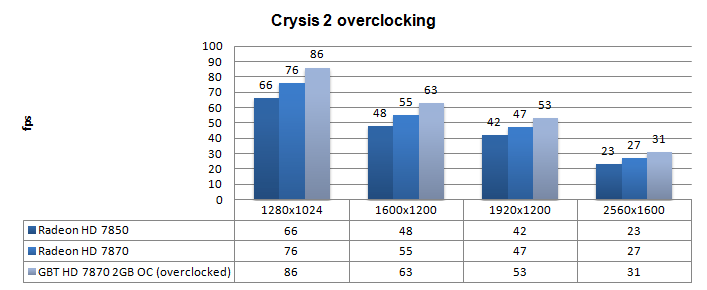
Above, Crysis 2, same maxed out image quality settings as before yet now with added overclock results:
- DirectX 11
- High Resolution Texture Pack
- Ultra Quality settings
- 4x AA
- Level - Times Square (2 minute custom time demo)
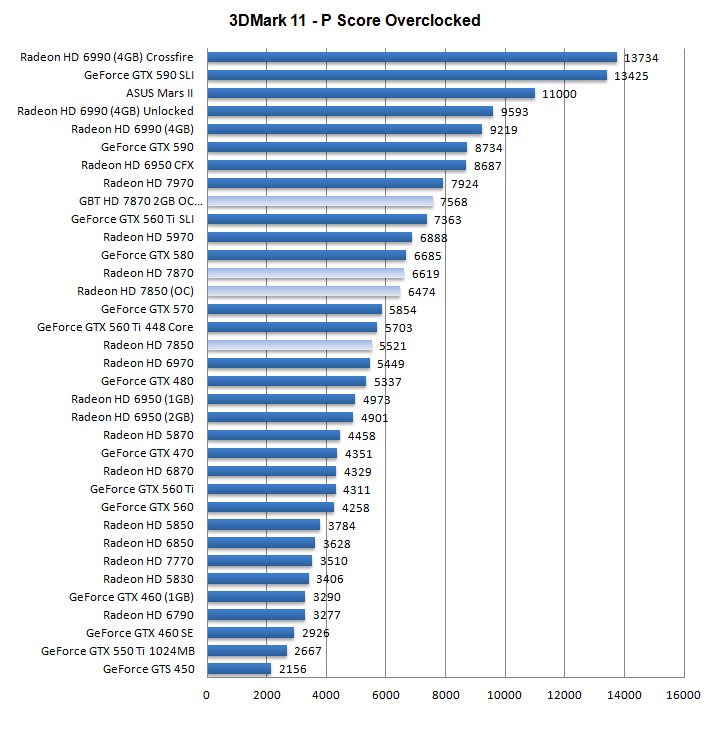
Above, 3DMark 11 - the Performance test and score. As you can see, there is an additional bump in this very GPU limited software, lovely.
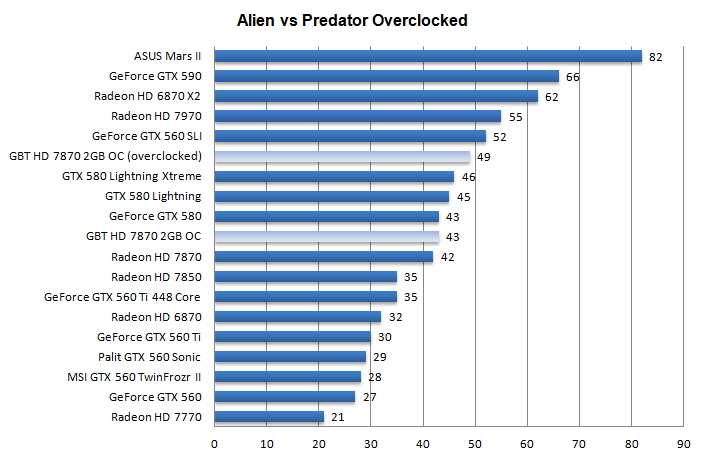
Above, Alien versus Predator, at 1920x1200 with 4x AA and 16X Anisotropic Filtering
