Guru3D.com
  • HOME
  • NEWS
    • Channels
    • Archive
    • Search
    • Submit
  • DOWNLOADS
    • New Downloads
    • Categories
    • Archive
    • Search
    • Submit
  • GAME REVIEWS
  • ARTICLES
    • Editorials
    • Guru3D VGA Charts
    • Rig of the Month
    • Join ROTM
    • PC Buyers Guide
    • Dated content
    • More Categories
  • HARDWARE REVIEWS
    • Videocards
    • Processors
    • Audio
    • Motherboards
    • Memory and Flash
    • SSD Storage
    • Chassis
    • Power Supply
    • Laptop and Mobile
    • Smartphone
    • Networking
    • Keyboard Mouse
    • Cooling
    • Knowledgebase
    • Search articles
    • More Categories
  • FORUMS
  • SEARCH
    • Search Articles
    • Search News
    • Search Files
  • NEWSLETTER
  • CONTACT

New Reviews
EVGA GeForce GTX 780 SC ACX review
Gigabyte GeForce GTX 780 WindForce 3x OC review
GeForce GTX 780 SLI and Multi monitor review
GeForce GTX 780 review
OCZ Vertex 450 SSD review
Gigabyte GeForce GTX 650 Ti Boost OC WindForce 2X review
MSI Radeon HD 7790 TurboDuo OC review
Metro Last Light VGA Graphics Benchmark performance test
Noctua NH-U12S and NH-U14S review
ASUS GeForce GTX 670 DirectCU Mini review

New Downloads
PrecisionX Download Version 4.2.0
GeForce 320.18 WHQL Driver Download
AMD Catalyst Application Profile Download 13.5 CAP1
MSI Afterburner 3.0.0 Beta 10 Download
PhysX System Software 9.13.0325 Download
GPU-Z Download 0.7.1
HWiNFO32 4.18 Download
HWiNFO64 4.18 Download
GeForce 320.14 BETA Driver Download
Nvidia Lifelike Human Face Rendering Tech Demo Download


New Forum Topics
by: Keitosha Crucial M4 firmware 070H (02/04/2013)by: StealBalls Z77 Maximus Formula OR Extreme?by: bishi Geforce GTX 780 Owners Clubby: Caenlen I just mined my first Bitcoin, where can I sell it?by: BetA March against MONSANTO - 25 May - Worldwideby: hallryu The Guru3D Screenshot Thread - RTFM! #22 (Rules update!)by: WhiteLightning Nvidia demonstrate physx in hawkenby: wasteomind Downsampling: How toby: stasio Nvidia GeForce 320.18 WHQL Download and Discussionby: xodius80 Essence St Drivers @win8 pro


Online Users
There are currently 3722 user(s) online:
Arbold, COD4000, Cyrosis, DesGaizu, evilkiller650, Google, lucidus, matrix6100, MSN, Noisiv, pilistorac, Redawgc187, RPGgamesplayer, scatman839, SSJBillClinton, Starfighter2, StealBalls, Stryfex, The Sleeper, Undying, usoldier, weah, WhiteLightning, Xendance, xxela, Yahoo


Guru3D.com » Review » Cooler Master CM 690 II Advanced review » Page 5

Cooler Master CM 690 II Advanced review

Posted by Hilbert Hagedoorn on: 02/22/2010 02:00 PM [ 0 comment(s) ]

Product gallery - Exterior | Interior
Tweet


Coolermaster CM 690 II

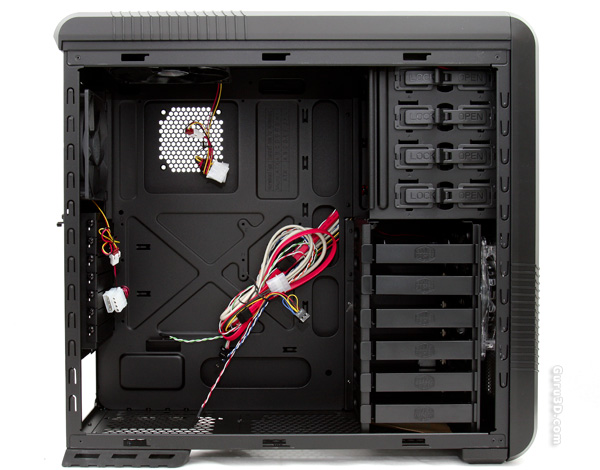
Right it's time to look at the innards. After removing the side panel we again can't help it bit are are immediately impressed by the completely black coating, our eyes get lured instantaneously to the six 3.5" removable trays for your HDDs, we spot holes for cable / wiring management, which is nice. Quite different from the original CM 690 alright. There's also plenty of spec to work in, but not unimportant, large and spacious enough to fit bulky components in. The one card though would possibly not fit would be the uber--lengthy Radeon HD 5970 though.
 

Coolermaster CM 690 II

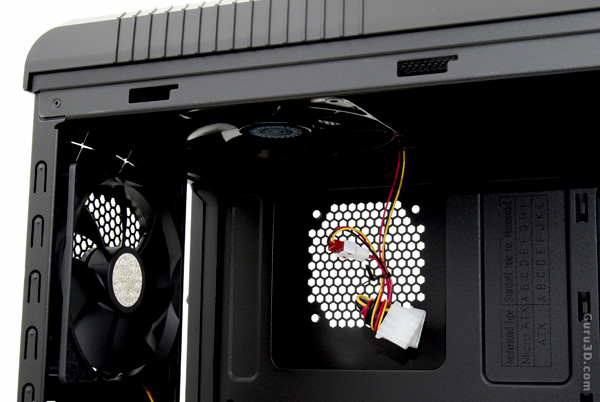
To the rear side and top we see that there are two 120mm fans pre-installed. Both can be connected directly to the peripheral PSU connector, or to the motherboard/fan controller. They can be PWM regulated meaning you can adjust the fan RPM and thus performance. Let's zoom in a little at the top fan though.
Coolermaster CM 690 II

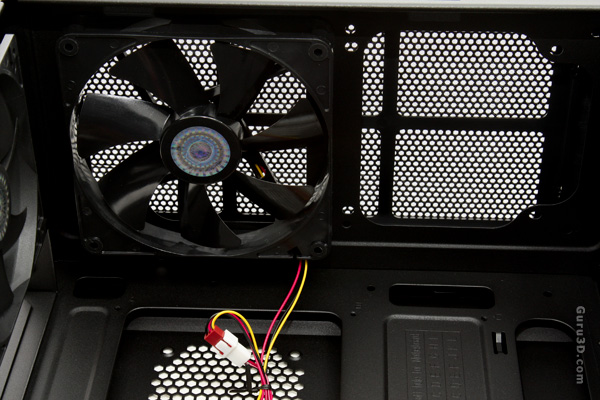
Yep, there it is .. you can install a second one, or should you require to do so, you could also install a radiator for liquid cooling here. The mounts are already there.
Coolermaster CM 690 II

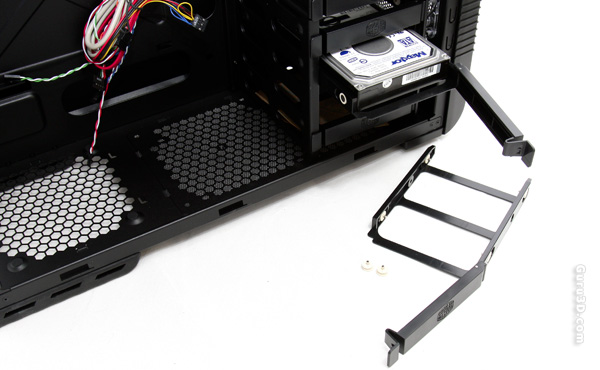
The CM 690 II has space for six 3.5" HDDs. All the HDDs are installed on a removable and swappable tray. The tray can be secured tightly into the drive bay. To install the drive, you bend it outward on the side of the tray and align screw holes on the drive with the installation pins on the tray. Once you have the drive on the tray, simply slide it back into the cage and lock it into place. The installation pins are rubber coated, preventing vibrations and noise.

The top HDD tray has an included adapter inside it that will allow you to install two 2.5" or 1.8" drives on to it and can then be placed into the hard drive cage which is very handy for a SSD drive..


7 pages « < 4 5 6 7


Guru3D.com » Articles » Cooler Master CM 690 II Advanced review » Page 5

Related Articles
Cooler Master Eisberg 240L Prestige review
We test and review the Cooler Master Eisberg 240L Prestige, a 240mm Liquid cooler that is performing nicely in a LCS kit that can actually be upgraded. Can it keep up with similar Asetek based products and their own Seidon series ? Let's find out!

Cooler Master CM Storm Scout 2 Advanced review
We review the new Cooler Master CM Storm Scout 2 Advanced edition (Ghost White edition) chassis. And if you think it looks familiar, well it's because it is. The product we'll review today is the CM Storm Scout 2 aimed at you guys, the gamers. The product however has for 98% the DNA of the CM Storm Scout, just a little smaller hence why you probably recognize it.

Cooler Master Seidon 240M review
We test and review the all new Cooler Master Seidon 240M review a 240mm Liquid cooler that is performing nicely in a scarce LCS kit market.

Cooler Master HAF XB review
We test and review the all new Cooler Master HAF XB mid tower chassis.The product is intended to be an easy to carry around chassis with but can also function as test-bench. Armed with rugged looks and a lot of features this might be a very interesting chassis to purchase. Have a peek at our full-blown review.

Follow Guru3D on Google+ - Facebook - YouTube - Twitter © 2013