
Guru3D.com
  • HOME
  • NEWS
    • Channels
    • Archive
    • Search
    • Submit
  • DOWNLOADS
    • New Downloads
    • Categories
    • Archive
    • Search
    • Submit
  • GAME REVIEWS
  • ARTICLES
    • Editorials
    • Guru3D VGA Charts
    • Rig of the Month
    • Join ROTM
    • PC Buyers Guide
    • Dated content
    • More Categories
  • HARDWARE REVIEWS
    • Videocards
    • Processors
    • Audio
    • Motherboards
    • Memory and Flash
    • SSD Storage
    • Chassis
    • Power Supply
    • Laptop and Mobile
    • Smartphone
    • Networking
    • Keyboard Mouse
    • Cooling
    • Knowledgebase
    • Search articles
    • More Categories
  • FORUMS
  • SEARCH
    • Search Articles
    • Search News
    • Search Files
  • NEWSLETTER
  • CONTACT

New Reviews
Gigabyte GeForce GTX 780 WindForce 3x OC review
GeForce GTX 780 SLI and Multi monitor review
GeForce GTX 780 review
OCZ Vertex 450 SSD review
Gigabyte GeForce GTX 650 Ti Boost OC WindForce 2X review
MSI Radeon HD 7790 TurboDuo OC review
Metro Last Light VGA Graphics Benchmark performance test
Noctua NH-U12S and NH-U14S review
ASUS GeForce GTX 670 DirectCU Mini review
OCZ Vertex 3.20 SSD review

New Downloads
GeForce 320.18 WHQL Driver Download
AMD Catalyst Application Profile Download 13.5 CAP1
MSI Afterburner 3.0.0 Beta 10 Download
PhysX System Software 9.13.0325 Download
GPU-Z Download 0.7.1
HWiNFO32 4.18 Download
HWiNFO64 4.18 Download
GeForce 320.14 BETA Driver Download
Nvidia Lifelike Human Face Rendering Tech Demo Download
3DMark Download v1.1.0


New Forum Topics
by: RS-X 3D Mark 2011 Guru3d Recordsby: CeeJay.dk SweetFX Shader Suite release and discussion thread #3by: agd900 13.1 Drivers with HD 4890 or..by: stasio Nvidia GeForce 320.18 WHQL Download and Discussionby: MerolaC HD 7950 or 7970?by: Stone Gargoyle Pimp your Gaming Videos!by: hallryu Crysis 3 #2by: Glidefan Vehicles of Guru3D thread #2by: putty LEAP Motion - Say goodbye to your mouse and keyboardby: The_Fool Need Advice on Fuel Injectors


Online Users
There are currently 2677 user(s) online:
deathfrag, eclap, Google, Icanium, KFleshman, Koniakki, kounelos, Live Search, Mike V, MSN, qwato, S3nt3nc3, Sergio, Yahoo, yasamoka


Guru3D.com » Review » ASUS Maximus V Extreme review » Page 1

ASUS Maximus V Extreme review

Posted by Hilbert Hagedoorn on: 07/19/2012 01:00 PM [ 0 comment(s) ]

Introduction
Tweet 


ASUS Maximus V Extreme

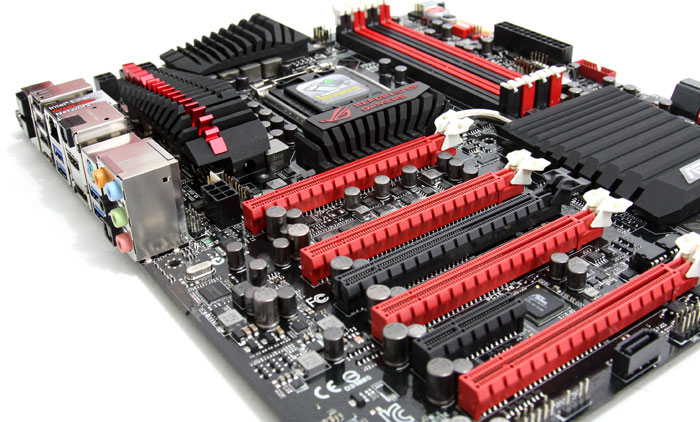
There is a kind, of people, that feels enough is not enough. They want moar' and for exactly that kind of enthusiast end user, ASUS creates ROG EXTREME products. There has been a lot of gossip and rumor about the project tested today already, and yes, it is the ASUS Maximus V Extreme!

The Maximus V Extreme main engine comes from the Intel Z77 Express chipset. But that's just the start of it of course. A motherboard that comes with four DDR3 memory slots and let's take graphics cards as an example. Four PCI Express 3.0 x16 slots for multi-GPU graphics configurations (NVIDIA SLI / AMD CrossFireX) is what you get. To get you four Gen 3.0 links, ASUS had to apply a trick, that was adding a PLX PEX8747 PCI-Express 3.0 switch IC, responsible for the so many slots. Two of the slots can operate in x16 mode, three of them in x16/NC/x8/x8 mode and all four in x8/x8/x8/x8 mode. And one x8 Gen 3.0 slot is actually similar to a full x16 gen 2.0 slot. Not bad.

But there is so much more going on on the Maximus V Extreme as there is a PCI Express x16 Gen 2.0 slot there (electrical x4), along with a PCI Express x4, Thunderbolt, twelve SATA ports and a multiple USB 3.0 headers. But wait Jim, there's more, ASUS threw in: 802.11 a/b/g/n Wi-Fi, an HDMI output, USB 3.0, 8-channel HD audio, etc.

This is a ROG (Republic of Gamers) motherboard, and that means extra enthusiast features alright, as for overclockers, here's where things start to get serious, the board is designed with a 12-phase Digi+ VRM, Subzero Sense, has voltage-measurement points and the ROG Connect technology (overclock the board via Bluetooth from their phone). And yes there's still more, ASUS throws in the OC Key as well, which creates an overlay on the active DVI monitor to adjust overclock settings in real-time without using additional software or hardware (it connects to the graphics card DVI port).

The ASUS Maximus V Extreme just breathes overclock potential. Taking the Core i7 3770K processor towards a 4.6~4.8 GHz on air cooling simply is a fairly easy task to accomplish. 

All that on a Z77 motherboard that has great looks. Z77 is of course the Intel chipset predominantly released for Ivy Bridge based processors. These motherboards will have a slightly altered feature set and thus support the new Ivy Bridge apples from Intel.

So today we have a closer look at the technology and of course a deep review of the the ASUS Maximus V Extreme. Armed with the latest key's and gadgets, some ROG lovin' and that Z77 chipset will most definitely surprise you. 

Briefly meet the product that really is Extreme... next page please.
ASUS Maximus V Extreme


25 pages 1 2 3 4 next »


Guru3D.com » Articles » ASUS Maximus V Extreme review » Page 1

Related Articles
ASUS Maximus V Extreme review
We review the ASUS Maximus V Extreme. There is a kind of people that feel enough is not enough, they want moar' and for exactly that kind of enthusiast end user ASUS creates ROG EXTREME products. This is a ROG (Republic of Gamers) motherboard, and that means extra enthusiast features alright, as for overclockers, here's where things start to get serious, the board is designed with a 12-phase Digi+ VRM, Subzero Sense, has voltage-measurement points and the ROG Connect technology (overclock the board via Bluetooth from their phone). And yes there's still more, ASUS throws in the OC Key as well, which creates an overlay on the active DVI monitor to adjust overclock settings in real-time without using additional software or hardware (it connects to the graphics card DVI port). The ASUS Maximus V Extreme just breathes overclock potential.

ASUS Maximus V Formula review
We review the ASUS Maximus V Formula.The Formula series equals style, features and highly tweakable motherboards -- all made with the ROG (Replublic of Gamers) backing it up. What defines the Formula the best however is that the heat sinks are in fact waterblocks, the Maximus V Formula can be used on both air and water as the Maximus V Formula eliminates heat with a unique aluminum-finned heatsink that combines an all-copper water channel and heatpipe in one.

ASUS Maximus V GENE Motherboard review
We review the ASUS Maximus V GENE Z77 Motherboard. a smaller motherboard (mATX) yet a product that just oozes with dandy features and overclock potential. Get this -- we took a Core i7 3770K processor towards 5.0 GHz. Next to the tweaking possibilities this is a ROG (Republic of Gamers) motherboard, and means extra enthusiast features alright.

ASUS Maximus IV Extreme Z review
ASUS completed its range of Z68 products as well, and the one that rules them all is probably the board as tested today. The Republic of Gamers team applied their typical bunch of lovin' and sweetness to the motherboard, driving the feature count up and the tweaking performance to new heights. Yes, the Maximus IV Extreme-Z Intel Z68 motherboard has arrived at the Guru3D test grounds all the way up the highlands of Holland.

Follow Guru3D on Google+ - Facebook - YouTube - Twitter © 2013