Guru3D.com
  • HOME
  • NEWS
    • Channels
    • Archive
    • Search
    • Submit
  • DOWNLOADS
    • New Downloads
    • Categories
    • Archive
    • Search
    • Submit
  • GAME REVIEWS
  • ARTICLES
    • Editorials
    • Guru3D VGA Charts
    • Rig of the Month
    • Join ROTM
    • PC Buyers Guide
    • Dated content
    • More Categories
  • HARDWARE REVIEWS
    • Videocards
    • Processors
    • Audio
    • Motherboards
    • Memory and Flash
    • SSD Storage
    • Chassis
    • Power Supply
    • Laptop and Mobile
    • Smartphone
    • Networking
    • Keyboard Mouse
    • Cooling
    • Knowledgebase
    • Search articles
    • More Categories
  • FORUMS
  • SEARCH
    • Search Articles
    • Search News
    • Search Files
  • NEWSLETTER
  • CONTACT

New Reviews
EVGA GeForce GTX 780 SC ACX review
Gigabyte GeForce GTX 780 WindForce 3x OC review
GeForce GTX 780 SLI and Multi monitor review
GeForce GTX 780 review
OCZ Vertex 450 SSD review
Gigabyte GeForce GTX 650 Ti Boost OC WindForce 2X review
MSI Radeon HD 7790 TurboDuo OC review
Metro Last Light VGA Graphics Benchmark performance test
Noctua NH-U12S and NH-U14S review
ASUS GeForce GTX 670 DirectCU Mini review

New Downloads
PrecisionX Download Version 4.2.0
GeForce 320.18 WHQL Driver Download
AMD Catalyst Application Profile Download 13.5 CAP1
MSI Afterburner 3.0.0 Beta 10 Download
PhysX System Software 9.13.0325 Download
GPU-Z Download 0.7.1
HWiNFO32 4.18 Download
HWiNFO64 4.18 Download
GeForce 320.14 BETA Driver Download
Nvidia Lifelike Human Face Rendering Tech Demo Download


New Forum Topics
by: hallryu The Guru3D Screenshot Thread - RTFM! #22 (Rules update!)by: WhiteLightning Nvidia demonstrate physx in hawkenby: wasteomind Downsampling: How toby: Caenlen I just mined my first Bitcoin, where can I sell it?by: BetA March against MONSANTO - 25 May - Worldwideby: stasio Nvidia GeForce 320.18 WHQL Download and Discussionby: xodius80 Essence St Drivers @win8 proby: Penal Stingray Wii U is Sweet!by: Plug2k The Adventures of vanhelsing ARTIFACTING MEMORY 79xx issueby: lucidus Suggestions for new build?


Online Users
There are currently 3629 user(s) online:
Arbold, COD4000, Cyrosis, Google, Live Search, matrix6100, MSN, pilistorac, pipes, Redawgc187, RPGgamesplayer, Skinner, SSJBillClinton, sverek, The Sleeper, Undying, usoldier, weah, WhiteLightning, Xendance, xxela, Yahoo


Guru3D.com » Review » Amilo SA3650 with Graphics Booster review » Page 1

Amilo SA3650 with Graphics Booster review

Posted by Hilbert Hagedoorn on: 02/05/2009 02:00 PM [ 0 comment(s) ]

Introduction
Tweet

FSC Amilo SA 3650 with Graphics Booster tested

Make a multi-monitor monster out of a laptop ...

Today we'll sidetrack a little ..   away from the hardcore uber gaming rigs towards ... a laptop.

But of course in the tradition Guru3D, it has to be gaming related in some way, so how does a laptop with an external graphics card sound ? Aah, so I have grabbed your attention, haven't I?

See, a common problem with a laptop is .. well, they are not really designed for gaming aren't they ? And sure there are some solutions out there with a more mainstream embedded GPU, yet often that is not completely affordable, let alone upgradeable.

AMD in corporation with Fujitsu Siemens Computers recently release their Amilo SA3650 Laptop with XGP Graphic Booster. XGP here is short for External Graphics Platform. .

See when you are at home fooling around with that laptop, you run into the restriction of the internal graphics chipset. Often it is way too slow to play modern age games with, with some very expensive exceptions aside though. XGP is a first good step to change that. With the help of a data cable an external PCIe bus is created. And while such a solution for many items like latency and data signaling this is not optimal, you however can achieve some interesting results. We were surely surprised to see PCIe x8 compatibility over a cable.

And that sums up XGP pretty well. The XGP graphic solution allows connecting an external graphic card to a laptop over its own port, which  takes over the graphic rendering tasks of the built in graphic chip. And that is intersting.

Connected to the other end of the cable, is a small breakout box, it's labeled as the Graphic Booster, and pretty much is an external Radeon HD 3870. Not only can you hook up 3 or 4 monitors, all of the sudden you can playback 1080P Blu-ray movies and actually play games relatively well, the way you are used to from an average to budget PC.

Interesting stuff I'd say. And though we think it might take a couple of years to really get the technology off the ground, we are fascinated by this idea alone.

Therefore a small insight into the Fujitsu Siemens Amilo SA3650 Laptop with XGP Graphic Booster. Mind you, this is merely an overview, rather than an in-depth review. Just a couple of pages to get you acquainted with this new technology to see if this at all has a future.

Next page please.
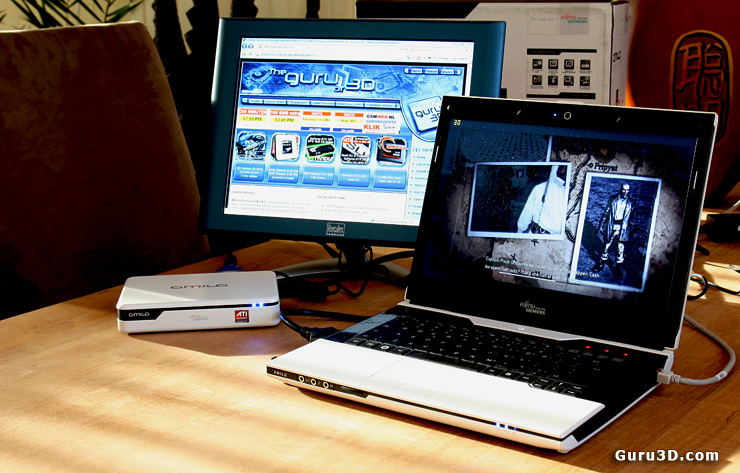
FSC Amilo SA 3650 with Graphics Booster


9 pages 1 2 3 4 next »


Guru3D.com » Articles » Amilo SA3650 with Graphics Booster review » Page 1

Related Articles
Amilo SA3650 with Graphics Booster review
Amilo SA3650 laptop with Graphics Booster tested - A common problem with a laptop is that they are not really designed for gaming aren't they ? And sure there are some solutions out there with a more mainstream embedded GPU, yet often that is completely unaffordable, let alone upgradeable. With the help of AMD XGP it is now possible to connect an external graphcis card, next to the laptop. Therefore a small insight into the Fujitsu Siemens Amilo SA3650 Laptop with XGP Graphic Booster.

Follow Guru3D on Google+ - Facebook - YouTube - Twitter © 2013